
Slack HIPAA BAA: Plans, Setup, And Compliance Checklist
Healthcare teams rely on Slack for fast internal communication, but the moment protected health information (PHI) enters a chat thread, you have a compliance problem. Slack isn't HIPAA-compliant out of the box. To use it legally in a healthcare context, you need the right subscription plan and a signed Slack HIPAA BAA (Business Associate Agreement) between your organization and Salesforce, Slack's parent company. Without that agreement in place, every message containing PHI is a potential violation, and a real liability.
The good news: Slack does support HIPAA compliance, but only on specific plans and with deliberate configuration. You need to know exactly which tier qualifies, what security settings to enable, and how your admin team should lock things down before any clinical or patient data touches the platform. The details matter, and getting them wrong is expensive.
This guide walks you through the plans that support a BAA, the steps to request and sign one, and a practical compliance checklist to keep your Slack workspace audit-ready. At SoFaaS, we help healthcare organizations navigate the compliance demands of connecting with EHRs and health data systems, and that same compliance mindset applies to every tool in your stack, including Slack.
What Slack HIPAA compliance means in practice
HIPAA compliance in Slack isn't a toggle you flip in your settings. It requires a legal agreement, specific plan access, and a set of technical configurations that your team actually follows. Slack sits in the category of a business associate under HIPAA, meaning it processes or transmits PHI on behalf of a covered entity. That relationship has to be formalized in writing before any patient data legitimately flows through the platform.
What HIPAA actually requires from a collaboration tool
Under HIPAA's Security Rule, any platform that stores or transmits PHI must meet specific administrative, physical, and technical safeguards. For a tool like Slack, this means the vendor must be able to sign a BAA, maintain encryption at rest and in transit, support audit logging, and give your organization control over data retention and access. These aren't optional features. They are the legal baseline for every collaboration tool that touches patient information.
Without a signed BAA in place, using Slack to share any patient information, even in a private DM, is a HIPAA violation regardless of the security settings you've configured.
Covered entities, such as hospitals, clinics, and health tech companies, carry the responsibility of ensuring every vendor that touches PHI has agreed to protect it. Slack, as a business associate, must honor those requirements, but only after both parties have executed the Business Associate Agreement and your workspace is configured to match the terms of that agreement.
What a Business Associate Agreement covers
A BAA is a binding legal contract between your organization (the covered entity) and Slack (the business associate). It outlines how Slack will safeguard PHI, what happens in the event of a breach, how data gets deleted, and what audit rights you retain. Signing a Slack HIPAA BAA doesn't make your workspace automatically compliant, but it does establish the legal foundation required by 45 CFR Part 164.
The agreement places obligations on both sides. Your organization must use Slack only within the scope of permitted purposes, and Slack must apply the security controls it has committed to in writing. If Slack experiences a breach that exposes PHI, the BAA defines the notification timeline and liability framework that governs the response. Neither party can simply ignore those terms once the agreement is signed.
What Slack can and cannot protect
Slack's BAA covers the core messaging infrastructure, including channels, direct messages, files, and search indexes stored on Slack's servers. Encryption at rest and in transit is active across these features when you're on an eligible plan. What the BAA does not cover is third-party integrations you add to your workspace. If you connect an external app that isn't HIPAA-compliant, PHI that flows into that app falls outside Slack's coverage entirely.
Your organization retains responsibility for everything outside Slack's direct control. That includes how your employees behave on the platform, which apps you allow, how you configure retention policies and message deletion schedules, and whether you've trained your team on what PHI can and cannot be shared. Slack gives you the infrastructure and the agreement. Your internal policies and configurations are what determine whether compliance actually holds in practice.
Step 1. Verify plan eligibility and key limitations
Before you request anything from Slack, confirm your organization is on a plan that actually supports a BAA. Slack restricts its Business Associate Agreement to specific paid tiers, and the free plan never qualifies under any circumstances. Sending PHI on an ineligible plan, even if your workspace looks identical to a qualifying one, creates legal exposure immediately and places your organization outside what HIPAA permits.
Plans that qualify for a Slack HIPAA BAA
Slack makes the Business Associate Agreement available on three paid plans: Pro, Business+, and Enterprise Grid. Most healthcare organizations operating at any meaningful scale will need Business+ or Enterprise Grid to access the admin controls required for HIPAA compliance. The Pro plan supports a BAA but delivers fewer data governance tools, which makes it significantly harder to enforce the technical safeguards HIPAA demands at the workspace level.

If your team is on the free Slack plan, you cannot obtain a BAA under any circumstances, and you must not share PHI in that workspace.
Here is a quick reference for plan eligibility and what each tier actually gives you:
| Plan | BAA Available | Key Limitation |
|---|---|---|
| Free | No | No BAA, no PHI permitted |
| Pro | Yes | Limited retention and export controls |
| Business+ | Yes | Full message retention, eDiscovery export |
| Enterprise Grid | Yes | Advanced DLP, audit logs, org-wide controls |
Limitations that apply even on eligible plans
Signing a Slack HIPAA BAA does not bring every feature in your workspace under the agreement's coverage. Certain Slack capabilities fall outside the BAA scope entirely, and using them alongside PHI creates a direct gap in your compliance posture. Slack AI features are currently excluded from the BAA, so your legal and compliance teams need to evaluate whether enabling them in a HIPAA-governed workspace is acceptable before turning them on for any clinical staff.
Third-party integrations carry the same risk. If you connect an external app to your Slack workspace, any PHI that flows into it is governed by that vendor's agreements, not Slack's. You are responsible for auditing every connected app and confirming each one has a valid BAA with your organization before PHI can reach it.
Step 2. Request and execute the Slack BAA
Once you've confirmed your plan qualifies, the next step is getting the agreement signed. Slack doesn't automatically provide a BAA when you upgrade to an eligible tier. You have to actively request it through Slack's sales or legal channels, and your organization's authorized signatory needs to review and execute the document before any PHI enters the workspace.
How to submit the BAA request to Slack
Slack routes BAA requests through its sales team for Business+ and Enterprise Grid accounts. You don't initiate this through your workspace settings. Instead, contact Slack directly at privacy@slack.com or through your assigned account representative if your organization already has an enterprise contract. Include your workspace URL, the name of your organization's legal contact, and a clear statement that you're requesting a HIPAA Business Associate Agreement.
Slack does not post a self-serve BAA in your account dashboard. You must contact their team directly, and processing typically takes several business days.
Here is a straightforward email template you can adapt:
Subject: BAA Request - [Your Organization Name]

Hi Slack Privacy Team,

Our organization, [Legal Entity Name], operates a Slack workspace
at [workspace URL] on the [Business+ / Enterprise Grid] plan.
We are a covered entity under HIPAA and require a signed Business
Associate Agreement before we can use Slack for workflows involving
protected health information.

Please send the BAA to [Legal Contact Name] at [email address].

Thank you,
[Your Name]
[Title]
[Organization]
What to review before your legal team signs
Your legal team should not sign the Slack HIPAA BAA without reviewing several specific clauses. Confirm the agreement covers message content, file storage, and search indexes, and verify that it explicitly identifies any excluded features your team plans to enable, such as Slack AI. Check the breach notification timeline: HIPAA requires notification within 60 days of discovery, and your BAA should reflect that or better.
Verify the data deletion and subprocessor disclosure provisions as well. Slack uses subprocessors to deliver parts of its service, and your BAA should identify them or link to a current list. Once legal has reviewed and both parties sign, store the executed agreement in your compliance documentation system alongside your other vendor BAAs.
Step 3. Configure Slack for HIPAA-safe messaging and files
Signing the Slack HIPAA BAA is the legal foundation, but the technical configuration is what actually protects PHI in your day-to-day workflows. Slack's admin settings give you control over message retention, file access, and workspace permissions, but none of those controls activate by default. You need to configure them deliberately before any clinical communication happens on the platform.
Set message and file retention policies
Your organization's HIPAA compliance program likely defines specific retention schedules for different categories of records. Slack lets you enforce those schedules at the workspace or channel level through the admin retention settings panel. Navigate to your Slack Admin console, select "Retention & Deletion" under the Compliance section, and set a retention window that matches your internal policy.

Retention settings apply to future messages by default. Work with your Slack account manager to confirm whether historical messages fall under any separate data handling obligations before you finalize your configuration.
For files, apply the same retention logic. Files shared in Slack channels inherit the channel's retention setting unless you override them at the workspace level. Set a default file retention policy that aligns with your HIPAA documentation requirements, and record that setting in your compliance system.
Control message export and audit access
Slack Business+ and Enterprise Grid both support message export through the Discovery and Retention APIs, which your compliance or legal team needs for audit and investigation purposes. Enable this access under your workspace's compliance settings and restrict export permissions to authorized administrators only. Limit the number of people with export rights to the smallest group that can operationally manage your audit and eDiscovery obligations.
Configure audit log exports if you are on Enterprise Grid. Audit logs capture user activity including sign-ins, file access, and channel membership changes. Route those logs to your SIEM or compliance management system so your security team can monitor for anomalies without logging into Slack manually. Keep a documented record of where those logs are stored and how long you retain them, since both details are relevant during a HIPAA audit or breach investigation.
Step 4. Lock down apps, access, and ongoing compliance
Your Slack HIPAA BAA and technical settings only hold up if you actively manage what connects to your workspace and who can access it. PHI exposure in Slack rarely comes from a single misconfigured setting. It usually comes from accumulated permission drift over time, such as stale app integrations, former employees with active accounts, or channels that expanded beyond their original audience. Locking things down is an ongoing operational task, not a one-time project.
Audit and restrict third-party app integrations
Slack's app directory contains hundreds of third-party tools, and by default, workspace members on most plans can install them without admin approval. Disable that setting immediately. In your Slack Admin console, navigate to "Permissions" and set app installation to require administrator approval for every new integration. This puts a gate between your workspace and any tool that could pull PHI outside Slack's covered infrastructure.
Any app that receives PHI from your Slack workspace must have its own signed BAA with your organization before you approve it for installation.
Review your current app list and remove any integration that lacks a valid BAA or that your team no longer actively uses. Keep a running inventory of approved integrations in your compliance documentation, including the date each BAA was signed and the scope of PHI that integration is permitted to access.
Control user access and workspace permissions
Set single sign-on (SSO) through your identity provider so that employee offboarding automatically revokes Slack access. Without SSO, former staff can retain workspace access until someone manually deactivates their account, which is a direct HIPAA risk. Require multi-factor authentication (MFA) for all workspace members, and enforce session timeout settings so inactive sessions do not remain open indefinitely.
Restrict the ability to create new channels and invite external guests to workspace admins or a designated compliance role. External guest accounts in particular can expose PHI to individuals outside your BAA framework if your team adds them to the wrong channel.
Schedule recurring compliance reviews
Set a quarterly calendar reminder to audit your user list, app integrations, retention settings, and admin permissions. Compliance in Slack degrades gradually as teams grow and workflows change. Each review should confirm that no unauthorized apps have been approved, all active users still require access, and your retention policies still align with your current HIPAA documentation requirements.
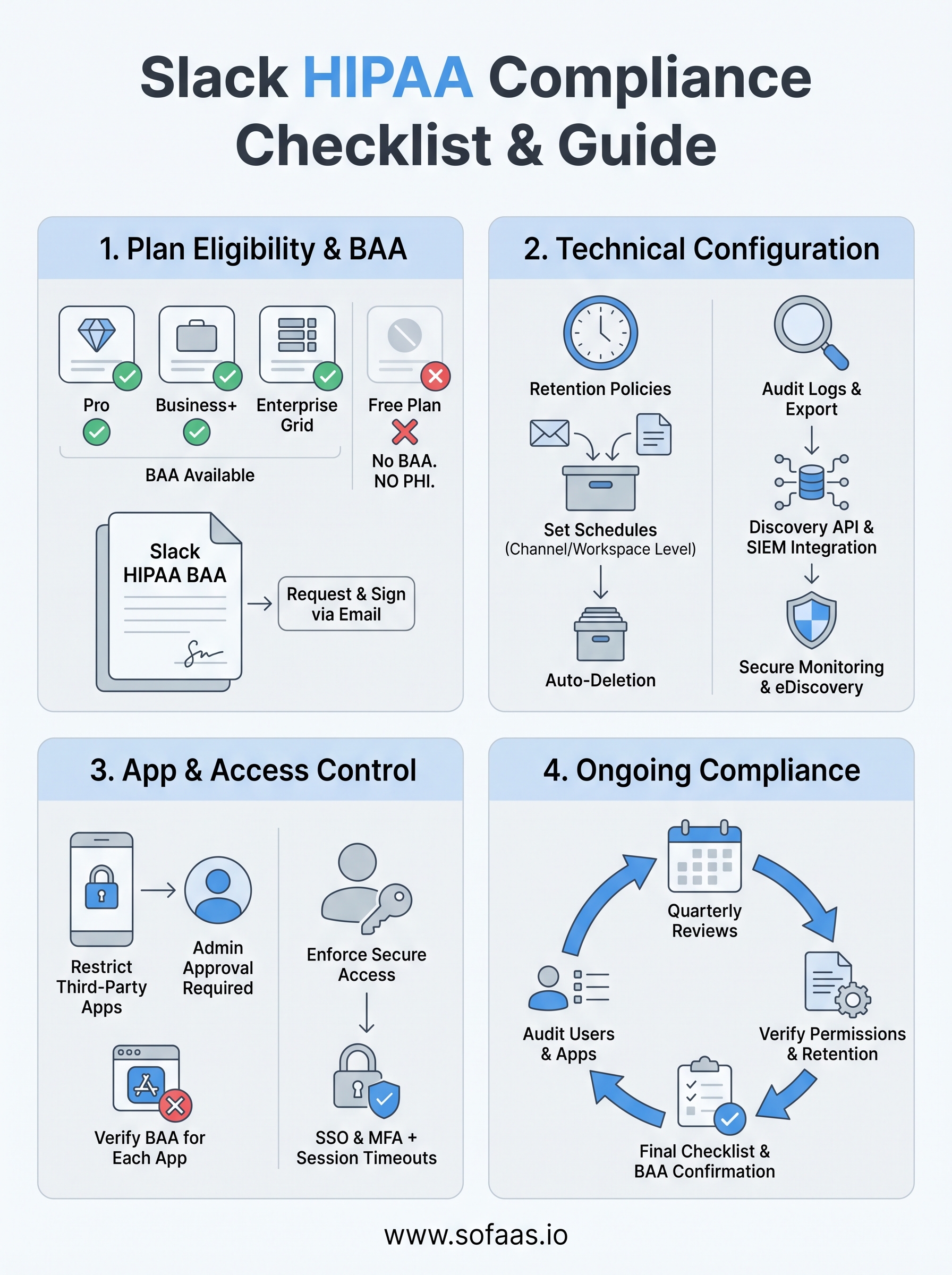
Final checklist before you share any PHI in Slack
Run through these items before any PHI touches your workspace. If you cannot check every box, stop and resolve the gap first.
- Your organization is on a qualifying paid plan (Pro, Business+, or Enterprise Grid)
- You have a signed Slack HIPAA BAA on file with Salesforce
- Message and file retention policies match your internal compliance schedule
- SSO and MFA are enforced for all workspace members
- App installation requires admin approval, and every connected app has its own BAA
- Audit log exports are routed to your SIEM or compliance system
- A quarterly review is scheduled to audit users, apps, and permissions
Slack is one piece of your broader compliance stack. If your workflows also involve EHR data and FHIR-based integrations, the same rigor applies to every system that touches patient records. Explore how SoFaaS handles HIPAA-compliant EHR integration so you can keep your entire data pipeline covered.