Google Cloud HIPAA BAA: Covered Services, Terms, And Setup

If you're building or running a healthcare application on Google Cloud, you can't process protected health information (PHI) without a signed Google Cloud HIPAA BAA in place. That's not optional, it's a federal requirement under HIPAA, and skipping it exposes your organization to serious legal and financial risk.
But the BAA itself raises plenty of questions. Which Google Cloud services does it actually cover? What are the terms you're agreeing to? And how do you go about signing one? These details matter, because using a non-covered service with PHI, even accidentally, can put you out of compliance overnight. For healthcare software teams already juggling EHR integrations, FHIR implementations, and security audits, understanding BAA coverage is a baseline requirement, not a nice-to-have.
At SoFaaS™, we help healthcare innovators connect their applications to EHRs through a managed, HIPAA-compliant SMART on FHIR platform, so compliance infrastructure like BAAs is something we deal with daily. This article breaks down exactly what Google Cloud's HIPAA BAA covers, what the key terms mean, and how to get yours set up step by step.
Why the Google Cloud HIPAA BAA matters
Under HIPAA, any vendor that handles protected health information (PHI) on your behalf is legally classified as a business associate. Google, when you use its cloud infrastructure to store, process, or transmit PHI, fits that definition. Without a signed Google Cloud HIPAA BAA, your organization is processing PHI with an entity that has no formal contractual obligation to protect it under HIPAA's requirements. That's a compliance gap that federal regulators at the Office for Civil Rights (OCR) take seriously.
Signing a BAA does not make you HIPAA compliant on its own. It establishes shared responsibility, but your configuration and data handling practices still have to meet the standard.
What happens if you skip it
If you use Google Cloud to handle PHI without a BAA, you're in violation of HIPAA regardless of how well you've secured your infrastructure. Penalties for HIPAA violations can range from $100 to $50,000 per violation, with annual caps reaching $1.9 million per violation category. Beyond fines, a breach without a BAA in place signals willful neglect to regulators, which typically triggers the harshest penalty tier.
Regulators don't need a confirmed data breach to find a violation. Simply storing PHI in Google Cloud without a signed BAA can trigger enforcement on its own if it surfaces during an audit or complaint investigation.
Why covered services matter
Not every Google Cloud service falls under the BAA, and that distinction is critical for your architecture decisions. Using a non-covered service with PHI, even within an otherwise compliant setup, creates a direct compliance gap that voids the protection your BAA provides.
Your engineering team might deploy a feature using a service that isn't on the covered list without realizing it. Without a clear internal policy, that move could put your entire application outside the bounds of your signed agreement with Google and expose your organization to regulatory risk.
What the BAA covers and what it excludes
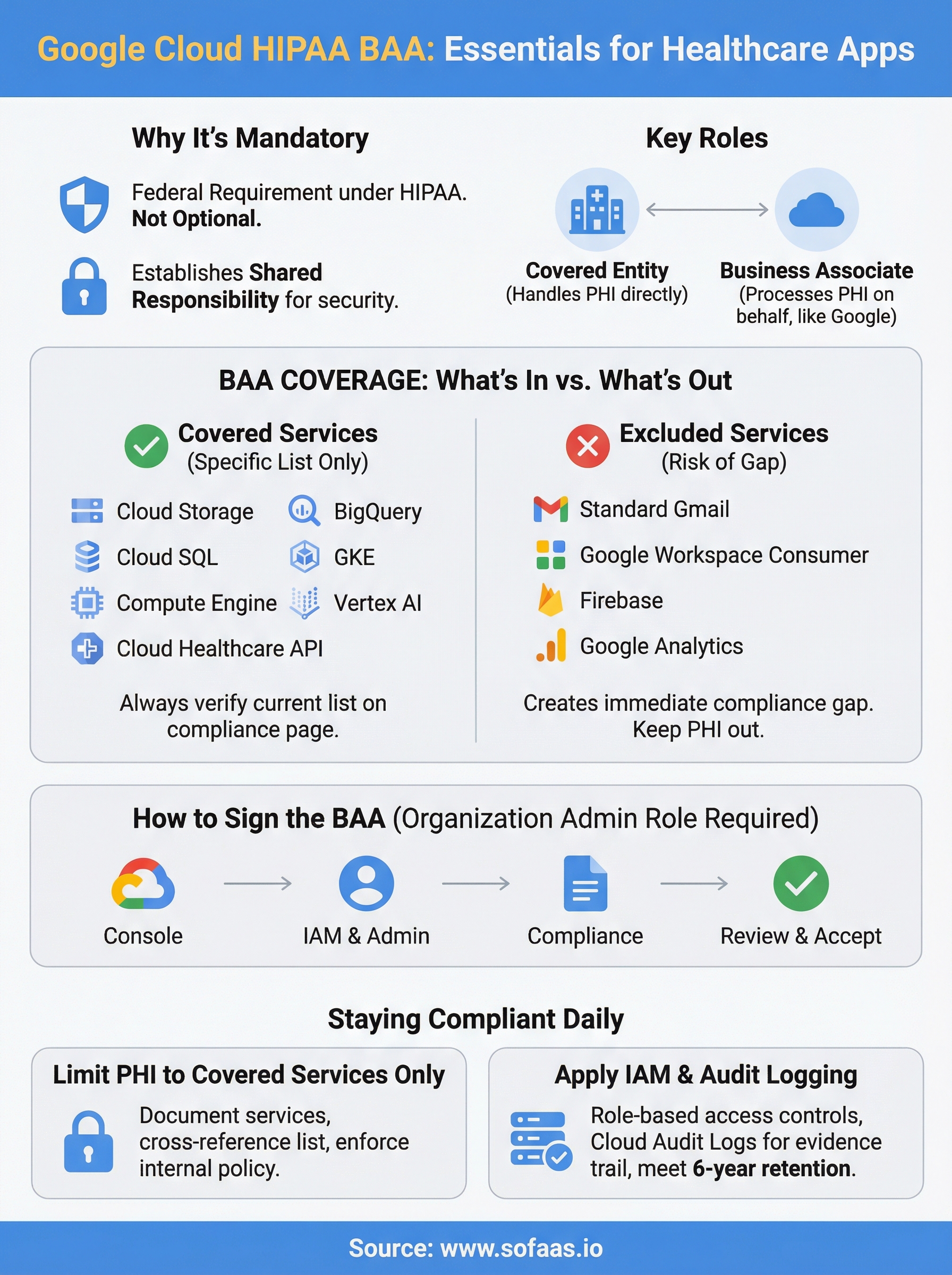
The google cloud hipaa baa does not apply to every Google service you use. Google maintains a specific list of covered services, and anything outside that list is not protected under the agreement, regardless of how you configure your environment or how secure your setup looks.
Services the BAA covers
Google's covered services include the core infrastructure and data tools most healthcare teams depend on. As of the current agreement, HIPAA-covered services include:

- Google Cloud Storage
- BigQuery
- Cloud SQL
- Google Kubernetes Engine
- Compute Engine
- Cloud Logging and Cloud Monitoring
- Vertex AI
- Cloud Healthcare API
Always verify the current list directly on the Google Cloud HIPAA compliance page, since Google updates its covered services over time.
What falls outside the BAA
Several widely used Google tools are not included in the BAA, such as standard Gmail, Google Workspace consumer accounts, Firebase, and Google Analytics. Routing PHI through any of these creates an immediate compliance gap that your signed agreement cannot cover.
Before you finalize your architecture, map every Google service your application touches and check it against the official covered services list. If a service isn't on the list, keep PHI out of it entirely.
Key terms to understand before you sign
Before you open the google cloud hipaa baa and start clicking through, you need to understand a few specific terms the agreement uses. These aren't legal formalities, they directly shape what Google is responsible for and what remains your organization's obligation under the agreement.
Shared responsibility model
The BAA operates under a shared responsibility model, meaning Google secures its underlying infrastructure, but you remain responsible for how your application uses that infrastructure. If your code mishandles PHI at the application layer, Google's BAA obligations don't shield you from the resulting compliance gap.
Your signed BAA does not transfer liability for your application's data handling practices to Google.
Covered entity and business associate
A covered entity is any organization that directly handles PHI in healthcare operations, such as a hospital or health plan. A business associate is a vendor, like Google, that processes PHI on your behalf.
Understanding this distinction clarifies why the BAA exists: it creates a formal, legally binding agreement that defines each party's responsibilities before any PHI flows through Google Cloud. If your organization qualifies as a covered entity, you are required to have this agreement in place before using Google Cloud for any PHI workloads.
How to sign the Google Cloud HIPAA BAA
Signing the google cloud hipaa baa is straightforward, but you need the right account setup before you start. The agreement is tied to your Google Cloud organization, not an individual project, so whoever signs it needs to hold an organization-level admin role with billing access.
Access the agreement through the Console
You complete the BAA directly inside the Google Cloud Console. Here's the process:

- Sign in to your Google Cloud account at console.cloud.google.com.
- Navigate to IAM & Admin > Settings at the organization level.
- Select Compliance from the left menu.
- Locate the HIPAA Business Associate Amendment and click Review and Accept.
- Read through the full agreement, then confirm acceptance.
Once accepted, the BAA applies to your entire organization, covering all projects under that organization node.
Verify acceptance before you process any PHI
After you complete the steps above, Google sends a confirmation email to the accepting user's address. Keep that email as part of your compliance documentation, since auditors may request evidence that a BAA was in place before PHI processing began.
Your legal team should review the agreement terms before anyone clicks accept. The BAA is a binding contract, and confirming it without internal sign-off is a process risk your organization can easily avoid.
How to run GCP in a HIPAA-safe way
Signing the google cloud hipaa baa is step one, but your day-to-day configuration determines whether you actually stay compliant. Google's shared responsibility model means your team owns the application layer, and that's where most compliance gaps appear in practice.
Limit PHI to covered services only
Your first operational rule should be simple: PHI never touches a non-covered service. Document which Google Cloud services each part of your application uses, then cross-reference that list against Google's officially covered services. Any service outside that list needs a clear internal policy that prohibits PHI from flowing through it, enforced at the infrastructure level wherever possible.
Treat your covered services list as a living document and review it every time your team adds a new GCP service to your stack.
Apply access controls and audit logging
Role-based access control through IAM limits which users and services can interact with resources that contain PHI. Pair that with Cloud Audit Logs, which record who accessed what and when, giving you the evidence trail that auditors expect to see.
Configure log retention policies to meet HIPAA's six-year record-keeping requirement. Export logs to a storage location that prevents tampering, and review access reports on a regular schedule rather than waiting for an incident to prompt the review.
Conclusion
A signed google cloud hipaa baa gives your organization the legal foundation it needs to process PHI on Google Cloud, but it only covers the services on Google's approved list. Your configuration, access controls, and audit logging practices determine whether you stay compliant day to day, and that responsibility sits entirely with your team.
If your application also needs to pull or exchange patient data from EHR systems like Epic or Cerner, compliance requirements extend well beyond the BAA. SMART on FHIR authorization, consent management, and secure data handling add another layer of complexity that takes significant time and expertise to get right.
That's exactly what SoFaaS™ handles for healthcare teams. Instead of building and maintaining your own HIPAA-compliant integration infrastructure, you connect through a managed platform that covers the EHR integration side so your team can focus on building the application itself.
The Future of Patient Logistics
Exploring the future of all things related to patient logistics, technology and how AI is going to re-shape the way we deliver care.
Thank you! Your submission has been received!
Oops! Something went wrong while submitting the form.