Fortinet Zero Trust Architecture: How It Works With ZTNA

Healthcare organizations manage some of the most sensitive data on the planet, and the old approach of trusting everything inside a network perimeter doesn't cut it anymore. Fortinet Zero Trust Architecture provides a framework that flips that model, requiring continuous verification of every user, device, and application before granting access to critical resources. For anyone building or operating technology that touches patient records and EHR systems, understanding how this framework works is essential.
At SoFaaS, we connect third-party healthcare applications to EHRs through a managed, HIPAA-compliant SMART on FHIR platform. Security isn't a feature we bolt on, it's foundational. That's why we pay close attention to how network-level security frameworks like Zero Trust interact with application-layer integrations. Fortinet's ecosystem, particularly its Zero Trust Network Access (ZTNA) capabilities, plays a direct role in how healthcare organizations protect the environments our customers integrate with.
This article breaks down what Fortinet's Zero Trust Architecture actually is, how ZTNA fits into the broader Fortinet Security Fabric, and what implementation looks like in practice. Whether you're a solutions architect evaluating security postures or a technical leader planning EHR integration projects, you'll walk away with a clear, actionable understanding of the framework and its components.
What Fortinet Zero Trust Architecture is
Fortinet Zero Trust Architecture is a security framework built around one governing principle: no user, device, or application receives automatic access to network resources simply because it sits inside your corporate perimeter. Fortinet implements this framework through a tightly integrated suite of products that work together under what the company calls the Security Fabric, a unified platform that enforces identity verification, device posture checks, and least-privilege access policies across your entire environment. Every access request gets evaluated on its own merits, every time, regardless of where the request originates.
The Core Principle: Never Trust, Always Verify
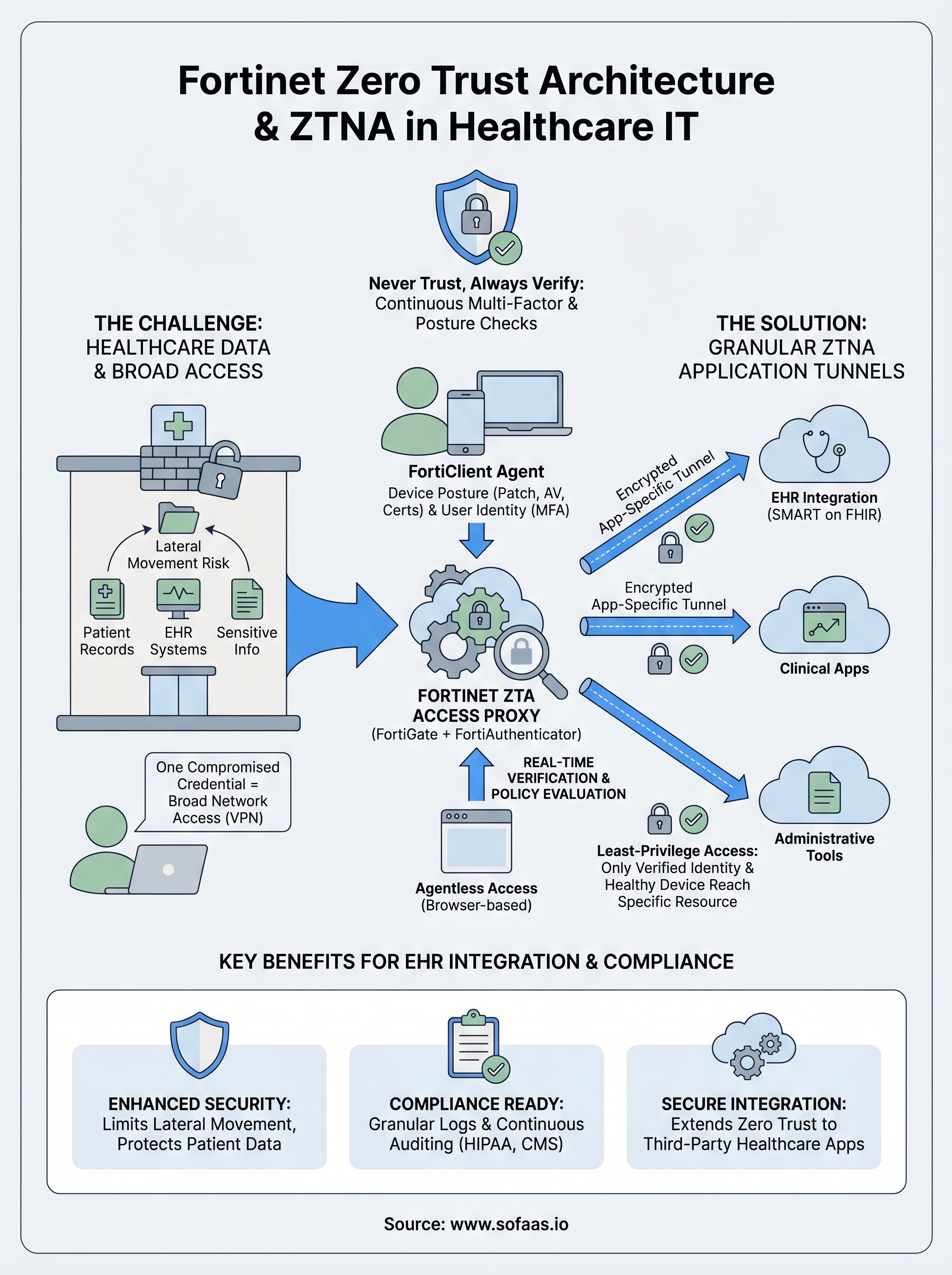
Traditional network security assumed that anything inside your firewall was safe. That assumption created enormous blind spots, because a single compromised credential could give an attacker lateral movement across your entire network. Fortinet's zero trust model eliminates that assumption by requiring continuous authentication and authorization, not just at login but throughout an active session.
Every session is treated as potentially hostile until the system confirms otherwise, which fundamentally changes how your security team approaches access control.
The approach relies on granular access policies tied to user identity, device health, location, and application context. Rather than granting broad network access, the system grants access to specific resources based on what the verified identity actually needs. Your users reach only the applications and data their role requires, and nothing more.
The Fortinet Security Fabric as the Foundation
Rather than operating as a standalone product, Fortinet Zero Trust Architecture runs through the Security Fabric, which connects FortiGate firewalls, FortiClient endpoints, FortiAuthenticator, FortiAnalyzer, and other components into a single enforcement ecosystem. Each product shares telemetry with the others, meaning a policy decision in one part of the network can trigger an automated response across the entire fabric in real time.
FortiClient acts as the endpoint agent that continuously checks device posture: patch levels, antivirus status, running processes, and certificate validity. FortiAuthenticator handles multi-factor authentication and identity validation, feeding verified identity data into FortiGate's policy engine. This tight integration means your security posture adapts dynamically rather than relying on static rules set once and forgotten.
ZTNA vs. Traditional VPN
Many organizations still rely on VPNs to give remote workers access to internal resources. The problem with VPNs is that once a user authenticates, they typically receive access to a broad network segment rather than a specific application. ZTNA replaces that broad access with application-level tunnels that open only after verifying both the user's identity and the device's security posture.

Fortinet's ZTNA implementation supports both agent-based and agentless access, depending on whether the device is managed or unmanaged. Agent-based access uses FortiClient to assess device health before establishing a connection, while agentless access handles browser-based applications through a proxy without requiring software installation. This flexibility lets your team extend zero trust controls to contractors, partners, and personal devices without weakening the verification process.
| Feature | Traditional VPN | Fortinet ZTNA |
|---|---|---|
| Access scope | Broad network segment | Specific application only |
| Device verification | Minimal or none | Continuous posture checks |
| Session monitoring | Limited | Real-time throughout session |
| User identity | Authenticated at login | Continuously re-verified |
Why Fortinet Zero Trust matters in healthcare IT
Healthcare organizations handle extraordinarily sensitive data while facing regulatory requirements that grow stricter each year. A single breach involving electronic health records can mean millions in HIPAA fines, legal exposure, and remediation costs. Fortinet zero trust architecture addresses both problems directly by treating every access request as a potential threat and enforcing strict verification before anything reaches protected systems.
Healthcare data is a high-value target
Medical records contain far more exploitable information than a stolen credit card number. A typical patient record includes Social Security numbers, insurance details, medication histories, and financial data, giving attackers everything they need for identity fraud. Healthcare organizations have reported more data breaches than any other sector in recent years, and attackers specifically target EHR systems because the data is dense, current, and hard to invalidate.
When attackers compromise a healthcare network, they rarely surface immediately. They move laterally for weeks, harvesting data while your perimeter tools report nothing unusual.
Compliance demands continuous verification
HIPAA's Security Rule requires technical safeguards that control access to electronic protected health information. Traditional broad-trust architectures make it difficult to prove that access to that information was granted only to authorized users under verified conditions. Fortinet's continuous verification model produces granular audit logs documenting who accessed what, when, and from which device, which is exactly what HIPAA auditors expect to see.
Beyond HIPAA, organizations handling Medicare and Medicaid data face additional scrutiny under CMS security requirements. Real-time device posture checks, identity verification, and session monitoring give your compliance team documented evidence that access controls function as intended, replacing static policy documents with measurable, verifiable outcomes.
EHR integrations expand the attack surface
Every third-party application connecting to your EHR system introduces a new potential entry point. When your organization integrates external platforms through APIs or middleware, those connections require the same rigorous access controls you apply to internal users. Fortinet zero trust architecture extends verification requirements to application-level traffic, ensuring automated data flows pass identity and posture checks before reaching protected health information.
For teams evaluating integration security, zero trust enforcement at the application layer covers the gaps that perimeter firewalls miss. Rather than assuming that traffic arriving from a trusted vendor is inherently safe, your security controls verify each connection on its own terms, including the session context, the originating device, and the application's authorization scope.
How Fortinet ZTNA works in a zero trust model
Fortinet ZTNA operates as the access enforcement layer within fortinet zero trust architecture, sitting between your users and the applications they need to reach. When a user attempts to connect to a protected resource, ZTNA intercepts that request and routes it through an access proxy hosted on FortiGate before any application traffic moves. That proxy becomes the single decision point where identity, device posture, and access policy all converge before a session opens.
The access proxy and identity verification flow
The access proxy on FortiGate evaluates each connection request against a set of ZTNA access rules you define based on user identity, device certificate, and application destination. FortiClient running on the endpoint collects real-time device posture data, including operating system patch status, firewall state, and antivirus version, then submits that data alongside the connection request. If the device fails any posture check, FortiGate denies access immediately, even when the user's credentials are completely valid.
Your posture policies function as a second lock on the door: a verified identity alone is not enough to open it.
FortiAuthenticator validates the user's identity through multi-factor authentication before the access proxy grants a session. Once both the identity check and the device posture check pass, FortiGate opens an encrypted tunnel directly to the specific application the user requested. That tunnel covers only that application, not your broader network segment, which limits what a compromised session could reach and reduces your lateral movement risk considerably.
Inline vs. agentless mode
Inline ZTNA mode applies when your users run FortiClient on company-managed devices. The client handles posture collection automatically and communicates directly with the FortiGate access proxy, giving you the most complete verification data available. Your security team gets session-level visibility into device health throughout the entire connection, not just at the moment of login.
Agentless ZTNA mode covers situations where installing FortiClient isn't practical, such as contractor-owned devices or personal equipment used for browser-based applications. In this mode, FortiGate acts as an HTTPS proxy and still enforces identity verification through FortiAuthenticator, though device posture checks are limited to what a browser session can report. Both modes enforce least-privilege access, meaning your users reach only the specific resources their policy explicitly permits and nothing beyond that boundary.
Fortinet ZTA building blocks and traffic flow
The components that make up fortinet zero trust architecture work as an integrated system rather than a collection of independent tools. Understanding each building block and how traffic moves through them helps you design and troubleshoot your deployment with confidence. Five core components carry the majority of enforcement work: FortiGate, FortiClient, FortiAuthenticator, FortiAnalyzer, and the ZTNA access proxy.
Core components and their roles
Each component handles a distinct job in the enforcement chain. FortiGate serves as the central policy engine and access proxy, intercepting all connection requests before they reach protected applications. FortiClient runs on managed endpoints and continuously collects device posture data, including patch levels, running processes, and certificate status, then passes that information to FortiGate for evaluation. FortiAuthenticator manages multi-factor authentication and identity validation, ensuring that only verified users move forward in the access flow. FortiAnalyzer aggregates logs and telemetry from all connected components, giving your security team a unified view of access events and policy decisions across the entire environment.
| Component | Primary Role |
|---|---|
| FortiGate | Policy engine and access proxy |
| FortiClient | Endpoint posture collection |
| FortiAuthenticator | Identity and MFA validation |
| FortiAnalyzer | Centralized logging and visibility |
How traffic moves from request to session
When a user requests access to a protected application, FortiClient on their device sends both the connection request and a current posture snapshot to the FortiGate access proxy. FortiGate checks that snapshot against your defined posture policies before it contacts FortiAuthenticator to confirm the user's identity through multi-factor authentication. Both checks must pass simultaneously for the session to proceed.

A failed posture check blocks the session regardless of whether the user's credentials are valid, which closes a gap that credential-based attacks routinely exploit.
Once FortiGate confirms both identity and device health, it opens an encrypted application tunnel that connects the user directly to the specific resource they requested. That tunnel carries only the traffic required for that application, and FortiAnalyzer records every event in the session, including policy evaluations and access denials. Your team can review those records during audits or incident investigations to confirm that access controls functioned as intended throughout the full session lifecycle.
How to implement Fortinet ZTA step by step
Implementing fortinet zero trust architecture is a structured process, not a one-time configuration task. Your deployment succeeds when you follow a deliberate sequence: define what you're protecting, configure your enforcement points, validate your posture policies, and iterate based on observed traffic. Rushing any of these steps produces gaps that undermine the entire verification model.
Step 1: Define your protected resources and access policies
Before you touch any hardware or software, map every application and data resource your users need to reach and document which roles require access to each one. This inventory becomes the foundation of your ZTNA access rules in FortiGate. Without a clear resource map, your policies will either be too permissive or block legitimate traffic, both of which create operational problems that slow down your deployment significantly.
Once you have that map, define your posture requirements for each resource tier. High-sensitivity systems like EHR integrations or financial data should require stricter device posture checks than general productivity tools. Establish minimum patch levels, mandatory antivirus status, and certificate requirements before you write a single policy rule in FortiGate.
Step 2: Configure FortiGate and FortiAuthenticator
Deploy FortiGate as your ZTNA access proxy and configure it to intercept traffic destined for your protected applications. Set up ZTNA server objects in FortiGate that map each protected application to the corresponding access rule. Connect FortiAuthenticator to your existing identity provider, whether that's Active Directory or an LDAP directory, so identity validation pulls from the authoritative source your organization already maintains.
Confirm that multi-factor authentication is enforced at the FortiAuthenticator level before you open any ZTNA access rules to production users.
Step 3: Enroll endpoints and test posture enforcement
Roll out FortiClient to your managed device fleet and configure the posture profile that matches the requirements you defined in Step 1. Run a pilot with a small group of users before expanding to your full organization, and use FortiAnalyzer to review every access event the pilot generates. Look specifically for posture check failures, policy denials, and sessions that passed verification but accessed unexpected resources.
After the pilot, refine your policies based on real traffic data, then expand enrollment in stages rather than all at once. This phased approach lets your security team catch misconfigured rules before they affect the broader user base and gives you a clean audit trail showing deliberate, tested expansion of your zero trust enforcement perimeter.
Key takeaways
Fortinet zero trust architecture shifts your security posture from perimeter-based trust to continuous verification, evaluating every user, device, and application before granting access to any resource. The Security Fabric ties FortiGate, FortiClient, FortiAuthenticator, and FortiAnalyzer into a unified enforcement system where each component shares real-time telemetry with the others.
ZTNA replaces broad VPN access with application-level tunnels that open only after both identity and device posture checks pass. Your users reach exactly what their role requires and nothing beyond that boundary, which limits lateral movement and reduces your overall attack surface significantly.
For healthcare teams managing EHR integrations, this framework directly addresses the compliance and data security requirements you face under HIPAA and related regulations. Building zero trust into your integration strategy starts at the application layer. If you want to see how secure, compliant EHR connectivity works in practice, explore the SoFaaS SMART on FHIR platform.
The Future of Patient Logistics
Exploring the future of all things related to patient logistics, technology and how AI is going to re-shape the way we deliver care.
Thank you! Your submission has been received!
Oops! Something went wrong while submitting the form.