SOC 2 Audit Requirements: Steps, Controls, And Checklist

If you're building or selling healthcare software, a SOC 2 report isn't optional, it's table stakes. Hospitals, health systems, and EHR vendors will ask for it before they'll even consider integrating with your product. Understanding SOC 2 audit requirements before you start preparing can mean the difference between a smooth audit and a costly, drawn-out mess that stalls your entire go-to-market timeline.
A SOC 2 audit evaluates your organization against the AICPA's Trust Services Criteria: security, availability, processing integrity, confidentiality, and privacy. But knowing the criteria exists is one thing. Knowing exactly what controls to implement, how to document them, and what evidence an auditor actually expects, that's where most teams get stuck. The process touches everything from access management and encryption to vendor oversight and incident response.
At SoFaaS, we built our managed SMART on FHIR platform on SOC 2 Type II compliant infrastructure from day one because our customers, healthcare software companies connecting to EHRs like Epic and Cerner, depend on it. We've been through the audit process ourselves, and we know what it takes to get it right.
This guide breaks down every step of preparing for a SOC 2 audit: the Trust Services Criteria you need to understand, the internal controls you'll need to build, the documentation auditors look for, and a practical checklist to keep your prep on track. Whether you're pursuing your first SOC 2 report or tightening up for a renewal, this is the roadmap.
What a SOC 2 audit covers and who performs it
A SOC 2 audit is a formal examination of whether your organization's systems and controls meet the AICPA's Trust Services Criteria (TSC). Unlike a self-attested checklist certification, a SOC 2 report is issued by an independent CPA firm that reviews your environment, tests your controls, and documents its findings. The report gives customers and partners objective evidence that you protect data seriously, not just your word for it.
The five Trust Services Criteria
The AICPA defines five TSC categories, and Security is the only one that every SOC 2 audit must include. The other four, Availability, Processing Integrity, Confidentiality, and Privacy, are optional depending on your services and what your customers require. Healthcare software companies almost always add Availability and Confidentiality because hospitals need to know your system stays up and their patient data stays protected from unauthorized access or disclosure.

Here's what each criterion covers:
| Criterion | What it covers |
|---|---|
| Security | Protection against unauthorized access, both physical and logical |
| Availability | System uptime as committed in your service agreements |
| Processing Integrity | System processing is complete, accurate, and timely |
| Confidentiality | Information designated as confidential is appropriately protected |
| Privacy | Personal information is collected, used, retained, and disposed of correctly |
The Security criterion, formally called the Common Criteria, forms the backbone of every SOC 2 report. Everything else builds on top of it.
Who conducts a SOC 2 audit
Only a licensed CPA firm with experience in AICPA attestation standards can issue a SOC 2 report. Your internal team cannot conduct or sign off on their own audit. You select and contract with an external auditor who runs the entire engagement, and that independence is what gives the report credibility in the market when you share it with prospective customers or partners.
When choosing a firm, look for auditors who have specific experience in your industry. A firm that has audited other healthcare software companies will understand your environment faster, ask sharper questions, and catch gaps more accurately than a generalist firm spending your time and budget learning your domain from scratch.
What auditors actually examine
Meeting the full SOC 2 audit requirements means giving auditors access to a wide range of evidence across your organization. They don't just read your policy documents and move on. Auditors pull system logs, access control lists, change management records, vendor contracts, and incident reports to test whether your controls actually operate the way your written policies say they do.
Auditors typically review:
- Access provisioning and de-provisioning records to confirm only authorized users hold active access
- Encryption configurations for data at rest and in transit
- Security monitoring and alerting setups, including alerts that fired and how your team responded
- Business continuity and backup test results with documented outcomes
- Vendor risk management documentation for third parties handling sensitive data
- Employee security awareness training records with completion evidence
Your scope boundaries directly control how much of this evidence an auditor will pull. A tightly defined scope covering only the systems that process customer data can keep the audit manageable. A loosely defined scope drags in systems, teams, and controls that add effort without adding value to the report. That scoping decision, covered in Step 1, shapes everything that follows.
Step 1. Pick trust services criteria and scope
The first decision you make shapes the entire engagement. Before you talk to an auditor or write a single policy, you need to lock in which Trust Services Criteria your audit will cover and exactly which systems fall within scope. These two choices determine the volume of controls you build, the evidence you collect, and how long the audit takes. Getting them wrong early creates rework that costs you time and money.
How to choose your Trust Services Criteria
Security is non-negotiable, it shows up in every SOC 2 report. Beyond that, your selection should reflect what your customers actually need from you and the commitments you make in your service agreements. For healthcare software companies, Availability and Confidentiality almost always belong in scope because downtime and data exposure are direct patient safety concerns.
Pick criteria that match your actual service commitments. Adding criteria just to appear more thorough will expand your control requirements without adding meaningful value for your customers.
Use this decision framework to guide your selection:
| Criterion | Include it if... |
|---|---|
| Security | Always required |
| Availability | You have uptime SLAs or customers depend on your service for time-sensitive workflows |
| Processing Integrity | You process financial transactions or time-critical data |
| Confidentiality | You handle proprietary data under NDAs or regulated information |
| Privacy | You collect, store, or process personal information like PHI or PII |
How to define your audit scope
Scope defines the systems, people, and processes an auditor will examine. A well-defined scope focuses the audit on the environment that directly delivers your service to customers, typically your production infrastructure, the teams that operate it, and the vendors who touch it. Everything else, development laptops, internal HR tools, and marketing systems, stays out.
To define scope, map every system that stores, processes, or transmits customer data. Document the data flow from the point a customer sends information into your platform to wherever it exits. Your scope boundary should sit around that flow. Once you have that map, list the supporting systems, like identity providers, cloud platforms, and monitoring tools, that protect or enable it. These fall inside scope because the full SOC 2 audit requirements apply to anything that underpins the security of your in-scope environment.
Step 2. Choose SOC 2 type and audit timeline
Once you've locked in your criteria and scope, you need to decide which report type you're pursuing and build a realistic timeline around it. This decision affects how much preparation time you need, what evidence you collect, and what the resulting report actually proves to your customers. Getting this wrong means either rushing a Type II audit you weren't ready for or spending months on a Type I report that your target customers won't accept.
Type I vs. Type II: what the difference means
A Type I report examines your controls at a single point in time. An auditor reviews your written policies and your control design and confirms they're in place as of a specific date. It doesn't test whether those controls actually operated consistently over time. A Type II report covers a defined observation period, typically six to twelve months, during which auditors test whether your controls operated effectively throughout that window.
If your target customers are hospitals or large health systems, a Type II report is almost always what they require, because it proves sustained control operation rather than a point-in-time snapshot.
Most healthcare software companies start with a six-month observation period to keep their first Type II audit manageable, then extend to twelve months for renewals. Some teams pursue a Type I first to validate their control design, then move into the observation period immediately after.
Planning your audit timeline
Realistic timeline planning keeps your audit from stalling mid-engagement. Work backward from your target report delivery date and block out each phase. Most teams underestimate the time required to gather evidence and remediate gaps before the auditor starts testing.
Use this template to map your timeline:
| Phase | Duration | Key activities |
|---|---|---|
| Scoping and criteria selection | 2 to 4 weeks | Define scope, select criteria, engage auditor |
| Control build and policy writing | 6 to 10 weeks | Document controls, assign owners, fill gaps |
| Observation period (Type II) | 6 to 12 months | Operate controls, collect evidence continuously |
| Readiness assessment | 4 to 6 weeks | Run internal audit, fix exceptions |
| Formal audit | 4 to 8 weeks | Auditor testing, evidence requests, walkthroughs |
| Report issuance | 2 to 4 weeks | Auditor drafts and issues final report |
Meeting the full SOC 2 audit requirements on time means treating this timeline as a fixed project plan, not a rough estimate. Assign a dedicated owner to each phase and track it the same way you track a product launch.
Step 3. Build your controls and policies
With your scope and timeline set, you move into the most labor-intensive phase: building the controls and policies that an auditor will test. This is where most teams lose momentum because they underestimate how much documentation and ownership structure is actually required to meet the full SOC 2 audit requirements. You don't just need a policy document. You need working controls that operate consistently and generate evidence an auditor can pull and verify.
Start with a control inventory
Before you write a single policy, map out every control you need to implement. Work from the Trust Services Criteria you selected in Step 1 and list the specific control objectives under each category. For each objective, identify the control activity that satisfies it and the system or process where it operates.
Use this format to build your inventory:
| Control objective | Control activity | System or process | Owner |
|---|---|---|---|
| Restrict access to production | Role-based access with MFA enforced | AWS IAM + Okta | Engineering Lead |
| Detect unauthorized access attempts | SIEM alerting on failed login thresholds | Datadog | Security Engineer |
| Protect data in transit | TLS 1.2 or higher enforced on all endpoints | Load balancer config | DevOps Lead |
| Respond to security incidents | Documented incident response procedure executed within 4 hours | Incident runbook | Security Lead |
Build your control inventory before you write any policies. Writing policies without knowing what controls exist produces documents that don't reflect how your environment actually works.
Write policies that match your controls
Your policy documents need to describe what your controls actually do, not what you wish they did. Auditors compare your written policies against your operating evidence. If your policy says access reviews happen monthly but your logs show they happened twice in a year, that gap becomes a finding.
Every policy should include a clear purpose statement, the scope it covers, specific procedures, the assigned owner, and a review frequency. Keep the language direct. A two-page policy that your team actually follows beats a twenty-page document that nobody reads.
Assign owners and close gaps
Each control needs a named individual responsible for operating it and producing evidence. Without clear ownership, controls drift during the observation period and auditors find gaps during testing. Assign owners in your control inventory, then run a gap analysis to identify controls you've documented but haven't fully implemented. Close those gaps before your observation period starts, not during it.
Step 4. SOC 2 controls checklist by area
Once your control inventory is complete, you need a structured way to verify coverage before your auditor arrives. This checklist organizes the most critical SOC 2 audit requirements by control area so you can work through each domain systematically and assign gaps to specific owners rather than treating the whole list as one undifferentiated task.
A checklist only works if each item has a named owner and a target completion date attached to it. Without that structure, items stay open indefinitely.
Access controls
Access management is the area auditors test most deeply, so your controls here need to be airtight before the observation period begins. Work through each item below and confirm you have operating evidence for all of them.
- Multi-factor authentication enforced for all production access
- Role-based access control configured and documented
- Quarterly access reviews completed with documented approvals
- De-provisioning process removes access within 24 hours of termination
- Privileged account inventory maintained and reviewed monthly
- SSH keys and API credentials rotated on a defined schedule
Change management and system monitoring
Change management controls give auditors confidence that your production environment only changes through an approved, tracked process. Monitoring controls prove your team detects and responds to anomalies rather than discovering problems after a customer reports them.
- All production changes go through a documented approval workflow
- Change tickets link to testing evidence before deployment
- SIEM or equivalent logging captures authentication events, privilege escalations, and access to sensitive data
- Alerting thresholds are configured and tested with documented results
- Log retention meets your policy commitment, with a minimum of 12 months recommended
- Incident response plan tested at least annually with documented outcomes
Vendor and risk management
Third-party vendors who touch your in-scope environment carry real risk into your audit. Auditors will ask for evidence that you vet vendors before onboarding and review their security posture on an ongoing basis.
- Vendor inventory lists all third parties with access to customer data
- Security questionnaires or SOC 2 reports collected for critical vendors
- Vendor contracts include data processing agreements and explicit security requirements
- Annual vendor risk reviews documented with findings and resolutions
- Subprocessor changes communicated to customers per your privacy commitments
Step 5. Evidence checklist and readiness testing
Building controls is only half the job. Before your auditor starts testing, you need to confirm that evidence is actually accumulating and that it matches what your policies describe. A readiness test, sometimes called a pre-audit assessment, lets you find gaps while you still have time to fix them rather than discovering problems when an auditor files a formal exception.
What evidence auditors request
Auditors don't accept your word that a control operates correctly. They pull specific artifacts for each control and trace them back to system logs, approval records, and configuration exports. The volume of evidence requests during a real audit surprises most first-time teams, which is why collecting and organizing evidence before the engagement starts is one of the most practical things you can do to satisfy SOC 2 audit requirements.
Gather evidence in each of these categories before your readiness test:
| Evidence category | Example artifacts |
|---|---|
| Access control | Access review sign-offs, MFA configuration exports, termination tickets |
| Change management | Change approval tickets with timestamps, deployment logs |
| Monitoring and alerting | SIEM alert configurations, incident tickets, on-call response logs |
| Encryption | TLS certificate records, encryption key management policies |
| Vendor management | Vendor SOC 2 reports, completed security questionnaires, signed DPAs |
| Training | Security awareness training completion records with dates |
Organize evidence in a shared folder mapped to each control in your inventory. When an auditor sends a request list, you should be able to respond within hours, not days.
How to run a readiness test
A readiness test simulates what your auditor will do: pick a sample of controls, request evidence, and check whether it matches your documented procedures. Assign someone who wasn't directly responsible for building the controls to run the test. Testers who built the controls tend to overlook the same gaps that an outside auditor will catch immediately.
Work through each control in your inventory and document:
- The evidence you collected and its date range
- Whether the evidence covers the full observation period without gaps
- Any exceptions where controls didn't operate as documented
- The remediation action and the named owner responsible for closing it
Once every exception has a documented remediation, you're ready to move into the formal audit.
Step 6. Run the audit and respond to requests
The formal audit begins once your auditor confirms scope and sends an opening document request list. Your team's job at this stage is to respond quickly, stay organized, and treat every auditor request as a priority. Delays in responding to evidence requests extend the audit timeline and can signal to auditors that your controls aren't as mature as your documentation claims.
What happens during the audit window
During the audit, your auditor selects a sample of transactions, access events, and control activities from across the observation period and requests evidence that each one operated as documented. They'll also schedule walkthroughs, short interviews where your team members explain how specific controls work in practice. Prepare your control owners for these conversations in advance so they can speak directly to their area without needing to look anything up mid-call.
Walkthroughs aren't tests of your memory. They're tests of whether your team actually operates the controls your policies describe, so make sure the right people are available and briefed before each session.
Auditors test areas like access provisioning, incident response, change approval workflows, and vendor review records. If they find a gap between your documented procedure and the evidence, they'll log it as an exception. The number and severity of exceptions directly affects the language in your final report, so catching and closing gaps before walkthroughs start matters.
How to handle evidence requests efficiently
Auditors typically send evidence requests through a shared tracker or a purpose-built audit management platform. Set up a clear internal triage process so each request routes to the right control owner within 24 hours and gets fulfilled within 48 hours wherever possible. Slow responses create bottlenecks that push your report delivery date further out.
Use this response workflow for every incoming request:
| Step | Action | Owner |
|---|---|---|
| 1 | Log the request in your internal tracker | Audit coordinator |
| 2 | Route to the named control owner | Audit coordinator |
| 3 | Control owner pulls and formats evidence | Control owner |
| 4 | Review evidence before submitting to auditor | Security lead |
| 5 | Submit with a clear label matching the request | Audit coordinator |
Meeting all SOC 2 audit requirements during the live engagement comes down to preparation and speed. Teams that pre-organized their evidence in Step 5 move through request fulfillment in hours. Teams that skipped that step spend days chasing artifacts that should have been ready before the engagement started.
Step 7. Fix exceptions and keep it current
Your auditor's findings don't disappear when the formal testing phase ends. Every exception logged during the engagement needs a documented remediation plan before the auditor closes the report. How you handle exceptions in this final phase directly shapes the language that appears in your SOC 2 report, which is the document your customers and partners will read.
Remediate exceptions before the report closes
When your auditor identifies an exception, they document the control that failed, the specific test where it failed, and the expected versus actual outcome. Your job is to investigate the root cause, implement a fix, and provide evidence of that fix to the auditor before they finalize their findings. Some exceptions are straightforward, like a missed quarterly access review that you can complete and document within days. Others point to a deeper control design gap that requires a process change.
Don't treat exceptions as failures to hide. Auditors expect some exceptions in every engagement. What they evaluate is whether your team identifies root causes and responds with a genuine fix rather than a one-time workaround.
For each exception your auditor logs, document the following in a remediation tracker:
| Field | What to record |
|---|---|
| Exception reference | Auditor's control ID and description |
| Root cause | Why the control failed, not just what failed |
| Remediation action | Specific fix implemented |
| Evidence of fix | Log export, approval record, or configuration screenshot |
| Owner | Named individual responsible |
| Completion date | Date fix was verified and submitted |
Build a continuous compliance program
Passing a single audit satisfies the SOC 2 audit requirements for that period, but your report expires. Customers will ask for your current report, and auditors will test the same controls again during your next engagement. Setting up a continuous compliance program after your first audit keeps your controls operating year-round rather than scrambling to rebuild everything six months before the next audit cycle starts.
Assign a quarterly controls review calendar that covers access reviews, vendor assessments, policy updates, and training completions. Treat each quarterly review as a mini readiness check: pull evidence, verify it matches your documented procedures, and close any gaps immediately. Teams that operate this way move through their annual renewal audit in a fraction of the time compared to teams that only think about compliance when an auditor asks.
Where to go from here
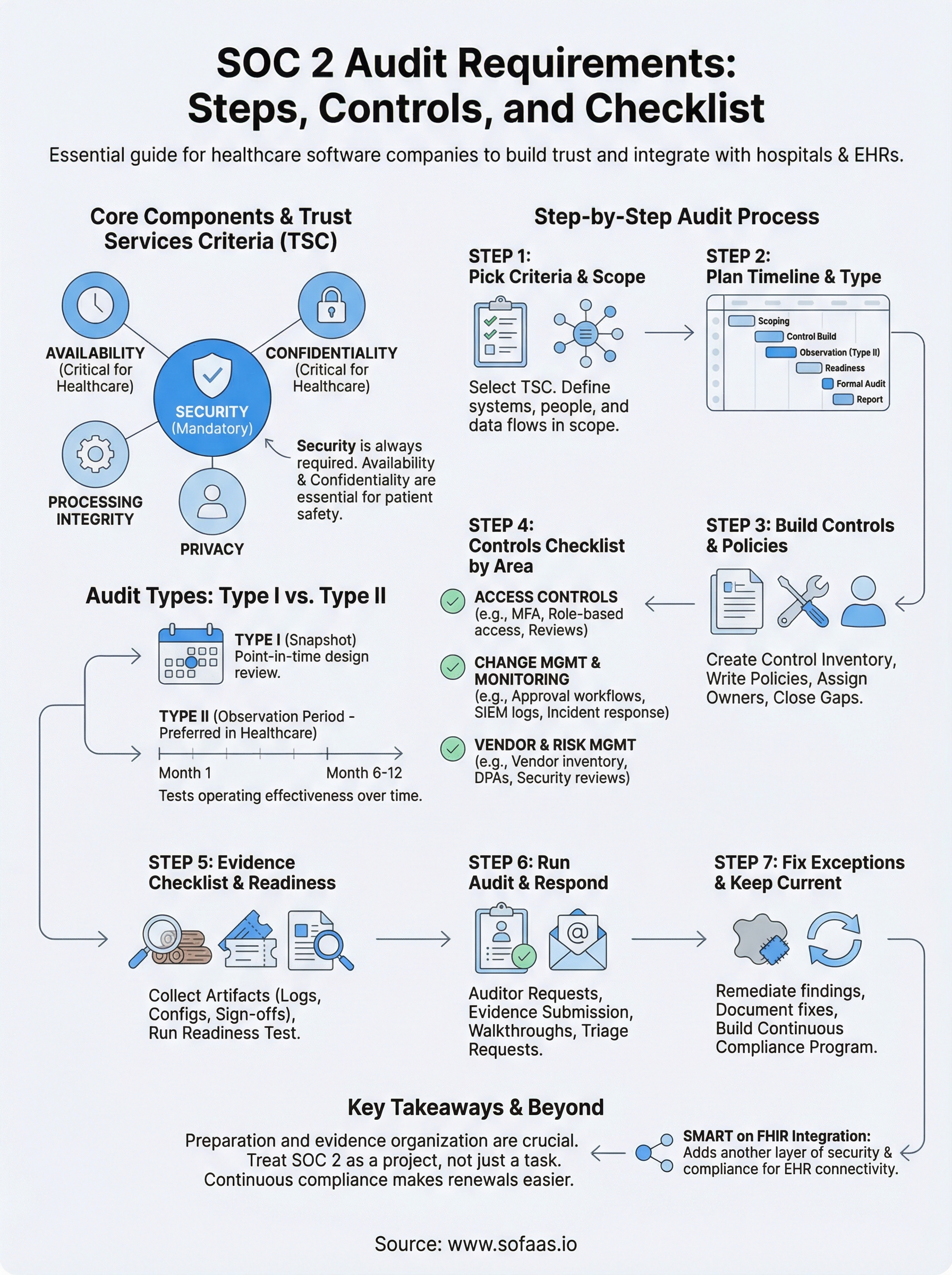
You now have a complete picture of what SOC 2 audit requirements actually demand: from choosing your Trust Services Criteria and scoping your environment to building controls, collecting evidence, and remediating exceptions after the audit closes. The process is structured and manageable when you treat it as a project with clear phases, named owners, and a fixed timeline rather than a vague compliance exercise you'll figure out as you go.
For healthcare software companies, SOC 2 compliance is rarely the only piece of the puzzle. If your application connects to EHR systems like Epic or Cerner, SMART on FHIR integration adds another layer of security and compliance complexity on top of your audit work. Launch your SMART on FHIR app without building that infrastructure from scratch, and let your team stay focused on the product work that actually moves your business forward.
The Future of Patient Logistics
Exploring the future of all things related to patient logistics, technology and how AI is going to re-shape the way we deliver care.
Thank you! Your submission has been received!
Oops! Something went wrong while submitting the form.