Clinical Decision Support: What It Is And How CDS Works

If you build software that touches patient care, you have probably heard the term thrown around in vendor pitches and EHR release notes without a clear definition attached. What is clinical decision support, exactly? At its core, it's technology that filters patient data through clinical rules and evidence to give a care team a specific, timely recommendation at the point of care, not just a data dump.
A clinical decision support system takes inputs like a patient's medications, allergies, labs, and diagnoses, runs them against clinical rules engines or evidence-based algorithms, and surfaces alerts, order sets, or reference information inside the clinician's existing workflow. The goal is fewer missed drug interactions, faster adherence to guidelines, and better outcomes without slowing anyone down.
In this article, we break down how CDS actually works under the hood, the main types you'll encounter (from drug interaction alerts to diagnostic support), and the real benefits and challenges teams face when deploying it. If you're integrating with EHRs to power these kinds of alerts, you'll also see why reliable, real-time data access matters just as much as the logic driving the recommendations.
Why clinical decision support matters in healthcare
Medication errors, missed allergies, and overlooked drug interactions still send thousands of patients to the emergency room every year, and most of these incidents are preventable with the right information at the right moment. That's the gap clinical decision support exists to close. When you ask what is clinical decision support in practical terms, the honest answer is: it's the safety net that catches what a busy clinician, working through a dozen patients an hour, might otherwise miss.
The stakes behind every alert
According to the CDC, adverse drug events account for a significant share of preventable harm in outpatient and inpatient settings alike. A CDS system that flags a dangerous drug combination before the prescription reaches the pharmacy isn't a nice-to-have feature, it's a direct intervention in patient safety. The same logic applies to diagnostic support tools that catch a pattern a physician might not connect on a first read, like early sepsis indicators buried in vital sign trends.
Clinical decision support turns scattered patient data into a specific, actionable warning before harm happens, not after.
Where CDS earns its keep
Beyond individual alerts, CDS shapes how consistently a whole care team follows evidence-based protocols, which matters enormously at scale. Consider where these tools typically deliver the most value:
- Medication safety: drug-drug, drug-allergy, and dosage checks at the point of prescribing
- Preventive care: reminders for overdue screenings, immunizations, or follow-up labs
- Chronic disease management: guideline-based nudges for diabetes, hypertension, or heart failure care
- Diagnostic support: pattern recognition across labs, imaging, and vitals that flags conditions early
Systems that reduce variation in care also reduce cost, since inconsistent treatment often means repeat visits, extended stays, or avoidable complications. That's why CDS matters just as much to a hospital's finance team as it does to the clinicians using it daily.
How clinical decision support systems work
Underneath every alert sits a straightforward pipeline: data comes in, rules or models evaluate it, and a recommendation goes back out to the clinician's screen. Knowing this pipeline matters if you're building or buying a CDS system, because the quality of each step determines whether the tool helps or just adds noise.
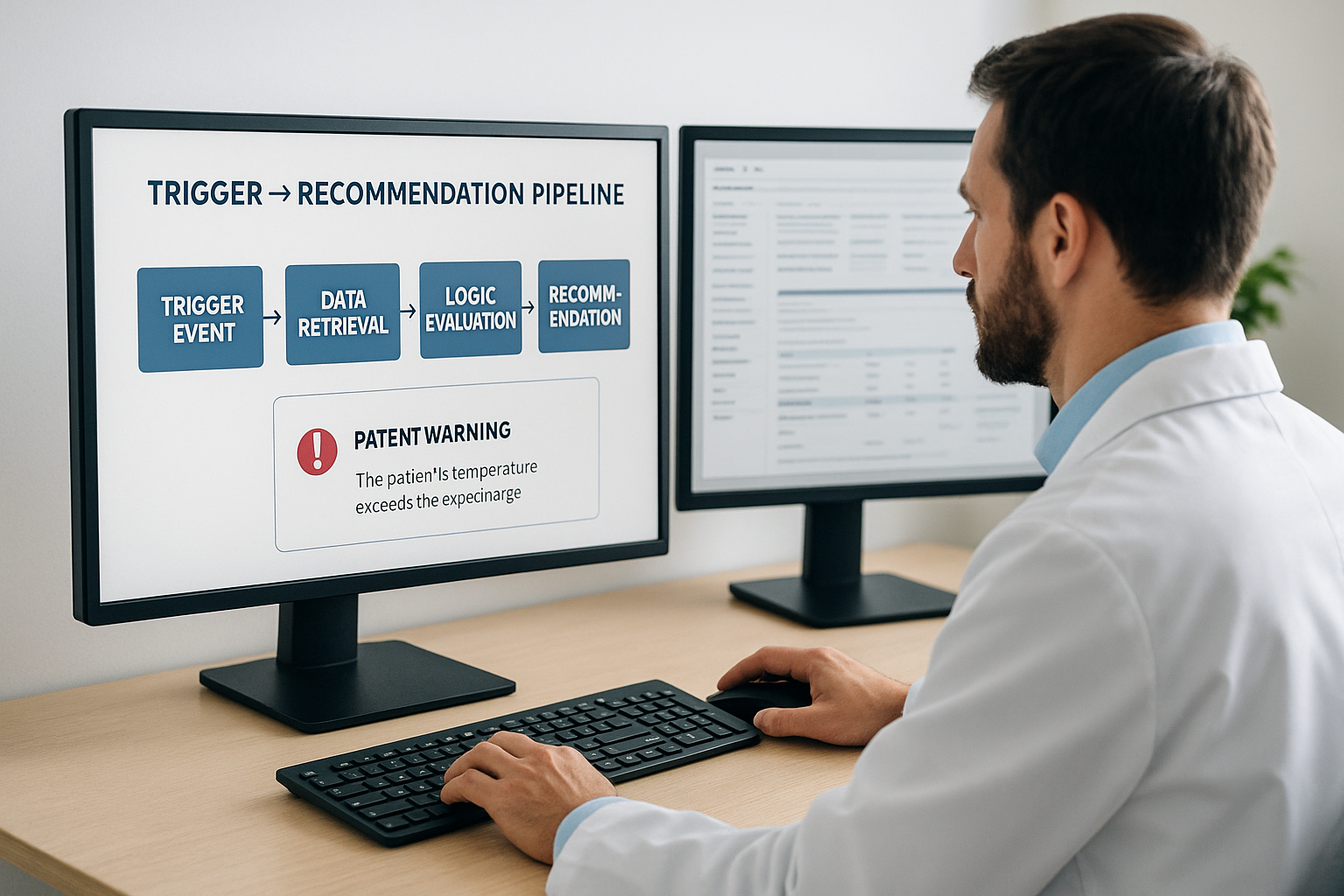
The trigger-to-recommendation pipeline
Each recommendation follows a repeatable sequence, whether it's a simple allergy check or a complex sepsis model:
- Trigger event: a new order, lab result, or vital sign entry fires the process
- Data retrieval: the system pulls relevant patient history, current medications, and problem list
- Logic evaluation: a rules engine or predictive model checks the data against clinical guidelines
- Recommendation delivery: an alert, order set, or reference note appears inside the clinician's workflow
A CDS system is only as fast and accurate as the data feeding it at each step of that pipeline.
Rules engines vs machine learning models
Most production systems still lean on deterministic rules engines, if-then logic built from published guidelines, because they're auditable and predictable. Newer platforms layer in machine learning models for pattern detection, like flagging early deterioration trends that a fixed rule would miss. Neither approach works without clean, current patient data arriving in real time, which is exactly where integration architecture becomes the bottleneck most teams underestimate.
Common types of clinical decision support tools
Drug interaction checkers are the most familiar form of CDS, but the category covers a much wider range of tools once you look past medication safety. Grouping them by function helps you see where each type fits into a clinical workflow and what data it depends on.
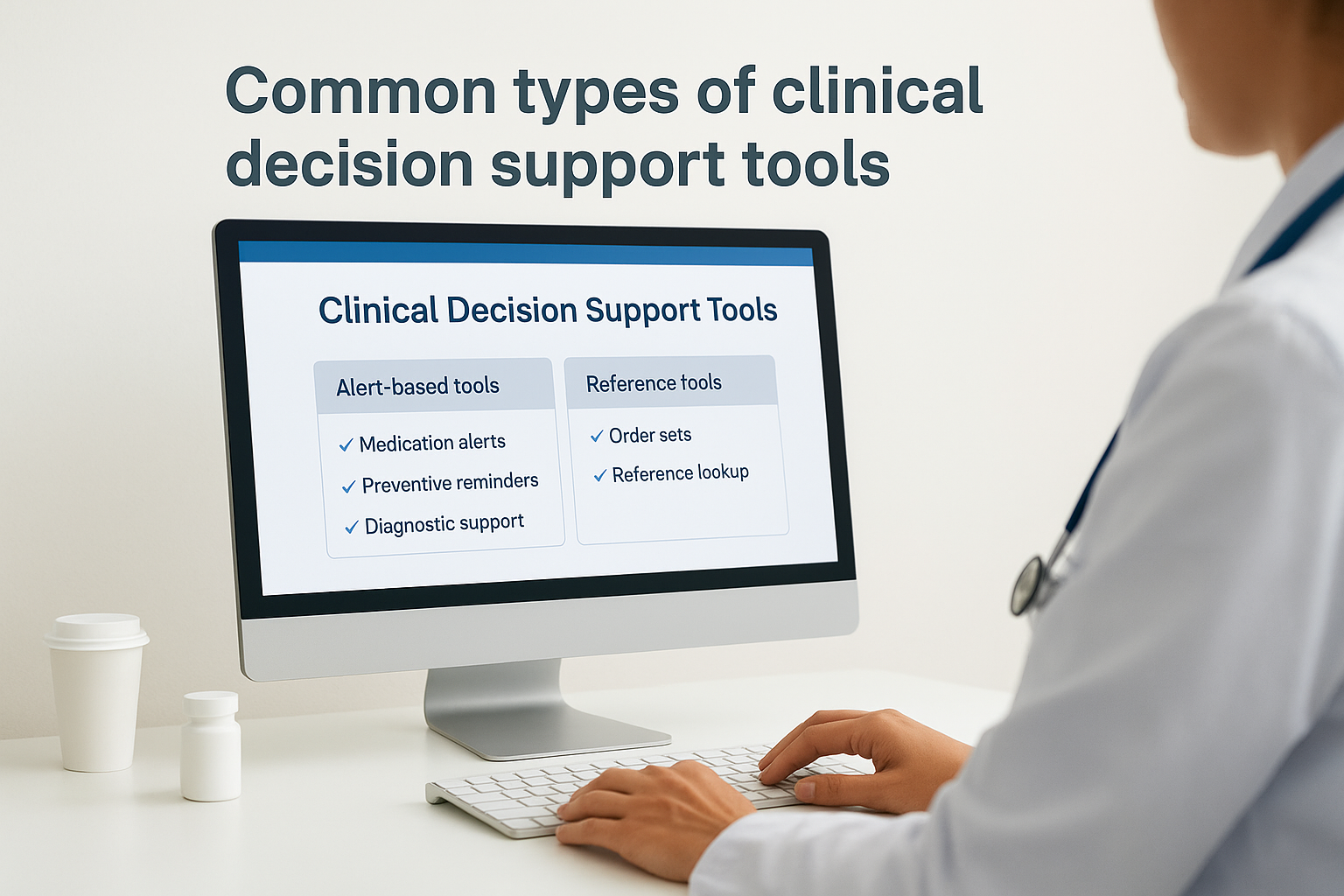
Alert-based and reference tools
Alerting tools interrupt the clinician at a decision point, usually during order entry, to flag a specific risk. Reference tools sit passively in the background until a clinician pulls them up for guidance.
| Tool type | Trigger | Example |
|---|---|---|
| Medication alerts | New prescription order | Drug-drug interaction warning |
| Preventive reminders | Scheduled visit or overdue interval | Mammogram due notice |
| Diagnostic support | Abnormal lab or vital trend | Early sepsis flag |
| Order sets | Diagnosis entry | Standardized admission protocol |
| Reference lookup | Clinician query | Dosage guideline for renal impairment |
The right CDS tool matches its trigger to the exact moment a clinician needs the information, not before and not after.
Order sets and documentation aids
Order sets bundle evidence-based steps, labs, medications, consults, into a single click, which cuts variation for common conditions like pneumonia or chest pain workups. Documentation aids, meanwhile, prompt clinicians to capture structured data that feeds back into future CDS logic, creating a loop where better documentation produces sharper future alerts. Each type solves a different problem, but all of them depend on the same thing: accurate, current patient data arriving exactly when the tool needs it.
Benefits and challenges of using CDS
Done well, clinical decision support cuts prescribing errors, tightens adherence to evidence-based protocols, and gives clinicians a second set of eyes during a rushed shift. Done poorly, it becomes the reason clinicians start ignoring their screens altogether.
What CDS gets right
Hospitals that deploy targeted CDS rules see measurable drops in adverse drug events and faster response times to abnormal labs. Preventive care reminders close gaps in screening rates that would otherwise slip through a packed schedule, and standardized order sets reduce the variation that drives up cost and complications.
Where CDS breaks down
The most common failure mode is alert fatigue, where clinicians face so many low-value pop-ups that they start clicking through everything without reading it. A few other recurring problems show up across most deployments:
- Alerts fire on outdated or incomplete patient data, producing false positives
- Rules built for one EHR configuration don't translate cleanly to another
- Override rates climb so high that the alert stops functioning as a safety check
- Maintenance lags behind updated clinical guidelines, so the logic goes stale
A CDS system that alerts too often is functionally the same as one that doesn't alert at all.
Most of these problems trace back to a single root cause: the data feeding the CDS engine is late, incomplete, or inconsistent across systems, which is exactly the integration challenge you have to solve before the smartest clinical logic can do any good.
Connecting CDS tools to EHR data via FHIR
Every CDS pipeline described above depends on one thing before the logic ever runs: standardized access to patient data sitting inside an EHR. That's where FHIR (Fast Healthcare Interoperability Resources) comes in. FHIR gives a CDS tool a consistent way to pull medications, labs, allergies, and problem lists from Epic, Cerner, or Allscripts without writing custom code for each system.
Why FHIR became the standard
Before FHIR, every EHR exposed data differently, which meant a CDS vendor rebuilt its data layer for each hospital it sold into. SMART on FHIR solved this by pairing a common data model with OAuth-based authorization, so a drug interaction checker or sepsis model can query one EHR the same way it queries another. The ONC now requires certified EHRs to expose FHIR APIs, which makes this the default path for any new CDS integration.
A CDS tool is only as trustworthy as the FHIR connection feeding it patient data in real time.
The integration burden CDS teams underestimate
Building that connection yourself means managing:
- OAuth token refresh and patient consent flows across multiple EHR vendors
- HIPAA-compliant audit logging for every data pull
- Real-time sync so alerts fire on current labs, not yesterday's
A managed layer like SoFaaS handles that plumbing, so your team spends its time on clinical logic instead of EHR-specific authentication quirks.

Putting clinical decision support to work
Clinical decision support only works when three things line up: clean data, sharp clinical logic, and a workflow that clinicians actually trust. Get any one of those wrong and you end up with alert fatigue instead of better outcomes. Clinical decision support isn't a single feature you bolt on, it's a pipeline that starts with reliable EHR data and ends with a recommendation a clinician can act on in seconds, not minutes.
Most teams underestimate how much of that pipeline is integration work rather than clinical logic. Building HIPAA-compliant FHIR connections to Epic, Cerner, and Allscripts from scratch can eat months before your first alert ever fires. That's the exact problem a managed FHIR platform solves, letting your team focus on the rules and models that make CDS useful in the first place.
If you're ready to build on top of real-time EHR data instead of fighting integration overhead, launch your SMART on FHIR app in a couple of steps.
The Future of Patient Logistics
Exploring the future of all things related to patient logistics, technology and how AI is going to re-shape the way we deliver care.
Thank you! Your submission has been received!
Oops! Something went wrong while submitting the form.