How to Build HIPAA Compliant Software: A Step-by-Step Guide

You have a healthcare app idea, a working prototype, or maybe a signed pilot customer, and now someone just asked if it's HIPAA compliant. Building HIPAA compliant software is not a checkbox you tick at launch. It touches your architecture, your vendor contracts, your access controls, and how you handle every byte of patient data from day one. Get it wrong and you risk fines, lost deals, or a breach that ends the company before it starts.
This guide walks through what compliance actually requires, not the vague legal summaries you find elsewhere. You'll learn how to classify protected health information (PHI), what technical safeguards auditors expect, and how to document your risk assessments so you can prove compliance instead of just claiming it.
We built this from the same integration challenges our team at SoFaaS solves daily: connecting apps to Epic, Cerner, and other EHRs without letting security slip. Whether you're building from scratch or adding EHR connectivity to an existing product, you'll get a practical, step-by-step path to compliant software, plus pointers on where a managed platform can remove the heaviest lifting so your team can focus on the product itself.
What HIPAA compliance actually requires from your software
HIPAA itself never mentions software. The law was written in 1996, long before SaaS existed, and it speaks in terms of "covered entities" and "business associates" handling health information. When you're building HIPAA compliant software, you're really implementing the technical, physical, and administrative safeguards spelled out in the HIPAA Security Rule and Privacy Rule, then proving you did it. That distinction matters because it means there's no single certification or badge you can buy. Compliance is a state you maintain, verified through documentation, audits, and your own risk assessments.
The three safeguard categories you must implement
The HHS Security Rule organizes requirements into three buckets, and your software touches all three even if some fall on your company's HR or facilities team rather than your codebase.
- Administrative safeguards: risk assessments, workforce training, designated security officers, and written policies for how PHI gets accessed and handled.
- Physical safeguards: control over the actual servers, workstations, and devices that touch PHI, including data center access if you're self-hosting.
- Technical safeguards: the part developers care about most, covering access controls, encryption, audit logs, and transmission security baked into the application itself.
HIPAA compliance is a maintained state, not a one-time badge you earn at launch.
Required vs addressable specifications
Inside the Security Rule, each safeguard is labeled either "required" or "addressable." This trips up a lot of teams because "addressable" sounds optional. It's not. Addressable means you must implement it unless you document a reasonable alternative or explain why it's not applicable to your environment. Encryption of PHI at rest, for example, is addressable, but in practice nearly every auditor and business partner expects it as a baseline. Skipping it without a documented justification is a red flag in any audit.
What auditors and partners actually check
When a hospital's security team or a potential enterprise customer reviews your software, they're not reading the statute. They're checking for specific, concrete evidence that your architecture and processes hold up. Expect questions like these:
- Is PHI encrypted in transit (TLS 1.2+) and at rest (AES-256)?
- Can you produce an audit log showing who accessed a specific patient record and when?
- Do you have unique user accounts with role-based access, not shared logins?
- Is there a signed Business Associate Agreement (BAA) covering this integration?
- What's your documented incident response plan if PHI is exposed?
- Do you have a current risk assessment on file, updated within the last 12 months?
If you can't answer these with specifics, not intentions, you're not compliant yet, regardless of how secure you believe your system is.
Why
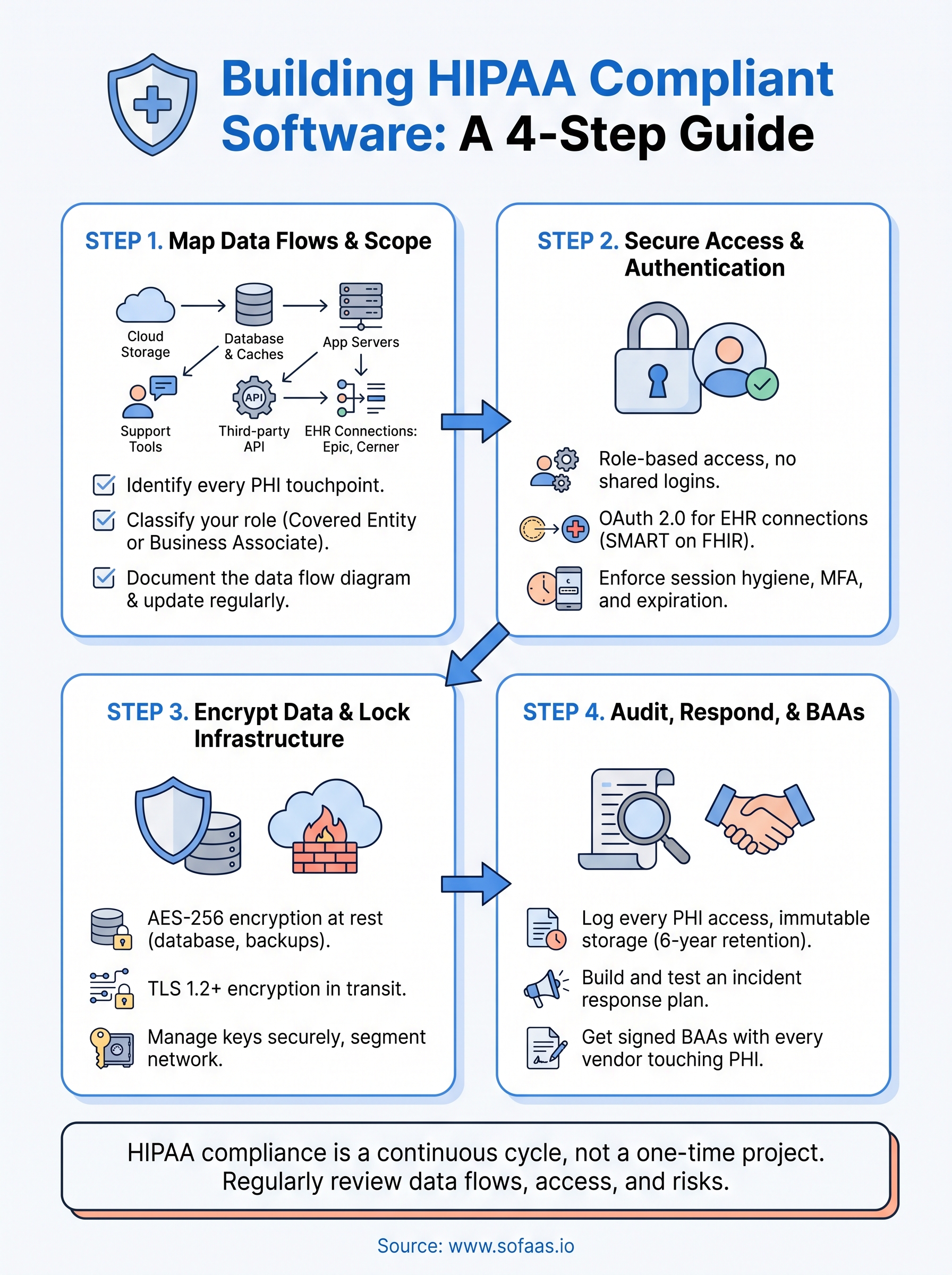
Step 1. Map your PHI data flows and compliance scope
Before you write a line of security code, you need a clear picture of where protected health information (PHI) enters, moves through, and leaves your system. Skipping this step is the number one reason teams miss safeguards later, because you can't protect data you haven't tracked. Mapping your data flows also defines your compliance scope, which tells you exactly which parts of your stack need HIPAA-grade controls and which don't.

Identify every place PHI touches your system
Start by listing every component that stores, processes, or transmits patient data, not just your primary database. Teams routinely forget log files, backup snapshots, analytics tools, and support ticket systems that accidentally capture patient names or medical record numbers.
- Application databases and caches
- File storage and backups (including cloud snapshots)
- Third-party APIs and EHR connections (Epic, Cerner, Allscripts, etc.)
- Logging, monitoring, and analytics pipelines
- Email, chat, or support tools your team uses to discuss patient issues
If PHI can land somewhere, assume it eventually will, and plan controls for that spot.
Classify your compliance role
Once you know where data lives, determine whether you're a covered entity or a business associate under HIPAA. Most software vendors serving healthcare clients fall into the business associate category, which means you're contractually and legally on the hook for safeguarding any PHI you touch on a covered entity's behalf. This classification shapes which safeguards apply directly to you versus which your customer's compliance team owns.
Document the data flow diagram
Regulators and enterprise security reviewers will ask for a data flow diagram, so build one now rather than scrambling later. Draw every system from the list above, show the direction data moves, and mark which connections are encrypted and which systems store PHI at rest versus just passing it through. Keep this diagram updated every time you add an integration or a new EHR connector, because an outdated map is worse than no map. Teams that use a managed integration layer like SoFaaS often find this step simpler, since the EHR connection points are already documented and scoped for them.
Step 2. Set up secure authentication and access controls
Once you know where PHI lives, the next question is who can touch it. Access controls are the technical safeguard auditors scrutinize hardest, because weak authentication is how most breaches actually happen. Shared logins, generic admin accounts, and password-only access are the fastest way to fail a security review, so this step deserves real engineering time, not a quick library install.
Build role-based access from day one
Give every user a unique account tied to a specific role, and design permissions around the minimum data that role needs to do its job. A billing clerk doesn't need to see clinical notes, and a support agent doesn't need full medical history. Role-based access control (RBAC) should map directly to job function, not convenience.
- Unique credentials per user, no shared or generic accounts
- Roles scoped to minimum necessary PHI access
- Automatic deprovisioning when someone leaves or changes roles
- Periodic access reviews, at minimum quarterly
Shared logins are the single fastest way to fail a HIPAA security review.
Implement OAuth 2.0 for EHR connections
Any integration touching Epic, Cerner, or another EHR should run through SMART on FHIR's OAuth 2.0 flow, which handles patient consent and token-based access instead of storing raw credentials. A minimal authorization request looks like this:
GET /authorize?
 response_type=code&
 client_id=YOUR_CLIENT_ID&
 redirect_uri=https://yourapp.com/callback&
 scope=patient/*.read launch/patient&
 aud=https://ehr.example.com/fhir
Handling token refresh, revocation, and scope management correctly is where most in-house builds stumble, since a single misconfigured scope can expose more PHI than intended. This is exactly the layer SoFaaS manages for you, so your team isn't reinventing OAuth handling for every new EHR.
Enforce session and credential hygiene
Sessions should expire after a reasonable idle period, typically 15 to 30 minutes for anything touching PHI, and multi-factor authentication should be mandatory for any account with administrative or clinical data access. Passwords alone are addressable under the Security Rule, but every serious auditor treats MFA as required in practice. Verify these controls extend to every environment, including staging and any internal admin tool your engineers use to debug production data.
Step 3. Encrypt data and lock down your infrastructure
Access controls decide who can reach your data, but encryption decides what happens if someone gets around those controls anyway. Every piece of PHI, whether it's sitting in a database or moving across a network, needs to be unreadable to anyone without the right keys. This step is where a lot of teams cut corners because encryption feels like a solved problem, but the details of how you implement it are exactly what auditors dig into.
Encrypt data at rest and in transit
Use AES-256 for anything stored on disk, including primary databases, backups, and file storage, and use TLS 1.2 or higher for every connection carrying PHI, internal or external. Don't assume your cloud provider's default settings cover you. Confirm encryption is actually enabled on each resource, not just available.
- Database-level encryption for all PHI-containing tables
- Encrypted backups and snapshots, not just live systems
- TLS enforced on every API endpoint, including internal service-to-service calls
- Encrypted storage for any file uploads containing patient documents or images
Encryption you forgot to enable protects nothing, so verify every resource, don't assume the default.
Manage your encryption keys properly
Encryption is only as strong as your key management. Store keys in a dedicated service like AWS KMS or Azure Key Vault rather than hardcoding them in application code or environment files checked into version control. Rotate keys on a defined schedule and restrict who can access or export them, since a leaked key defeats encryption entirely.
Segment and harden your network
Lock down your infrastructure so PHI-handling systems sit behind restrictive firewall rules and network segmentation, separate from public-facing components that don't need direct data access. Limit database access to specific application servers rather than opening it broadly, and disable any unused ports or default credentials that come with cloud instances.
| Layer | Control | Why it matters |
|---|---|---|
| Storage | AES-256 encryption | Protects data if disks or backups are exposed |
| Transit | TLS 1.2+ | Prevents interception between services |
| Keys | Managed key vault, rotation | Limits blast radius of a leaked credential |
| Network | Segmentation, firewall rules | Contains breaches to a smaller surface |
Getting infrastructure right takes real engineering time, and it's a big reason healthcare teams lean on a platform like SoFaaS, which runs on SOC 2 Type II compliant infrastructure with encryption and segmentation already built in, so you're not architecting this layer from scratch for every new integration.
Step 4. Add audit logging, incident response, and BAAs
Encryption and access controls stop most problems, but HIPAA still expects you to prove what happened if something goes wrong. That means capturing every touch of PHI in an audit log and having a tested plan for the day a breach actually occurs. Auditors and enterprise partners will ask for both, and "we'll figure it out if it happens" is not an answer that passes a security review.
Log every access to PHI
Your audit log needs to answer who accessed what, when, and from where, for every record containing patient data. Skip generic application logs and build a dedicated audit trail that can't be edited or deleted by the same users it's tracking.
- User ID, timestamp, and action for every PHI read, write, or export
- Source IP or device for each access event
- Immutable storage, separate from your primary application database
- Retention of at least six years, matching HIPAA's documentation requirement
An audit log you can't produce on demand is the same as having no audit log at all.
Build an incident response plan before you need one
Write down exactly what happens the moment someone suspects a breach: who gets notified, how you contain the exposure, and how you determine whether it meets the threshold for HHS breach notification rules. Test this plan with a tabletop exercise at least annually, because a plan nobody has practiced tends to fall apart under real pressure. Assign a specific person as your security officer, since HIPAA requires someone accountable by name, not just a policy document sitting in a shared drive.
Get signed BAAs with every vendor touching PHI
Any vendor that stores, processes, or transmits PHI on your behalf, cloud hosting providers, EHR integration platforms, analytics tools, needs a signed Business Associate Agreement (BAA) before you send them a single record. No BAA means you're liable for whatever that vendor does with the data, and missing one is an instant red flag in any partner or hospital security review.
Here's what to check before you sign:
- Does the BAA name the specific services covered?
- Are breach notification timelines and responsibilities defined?
- Does it cover subcontractors the vendor uses (fourth parties)?
- Is there a clause for data return or deletion at contract end?
SoFaaS provides a signed BAA as part of its managed EHR connections, which removes one more contract negotiation from your launch checklist.
Keeping your software compliant as it grows
Compliance doesn't freeze once you launch. Every new feature, EHR connection, or hire changes your risk profile, so treat these four steps as a recurring cycle, not a one-time project. Revisit your data flow map when you add an integration, re-run access reviews when your team changes, and update your risk assessment at least annually. Auditors and enterprise customers will keep asking the same hard questions years from now, and you need current answers, not launch-day snapshots.
Growing a healthcare product while maintaining every safeguard yourself pulls engineering time away from the product itself. That's the gap a managed platform is built to close, handling the EHR connections, OAuth flows, and infrastructure security so your team isn't rebuilding compliance work for every new integration. If you're ready to add SMART on FHIR connectivity without carrying that burden alone, launch your SMART on FHIR app in a couple of steps with VectorCare's SoFaaS platform.
The Future of Patient Logistics
Exploring the future of all things related to patient logistics, technology and how AI is going to re-shape the way we deliver care.
Thank you! Your submission has been received!
Oops! Something went wrong while submitting the form.