Terraform Vault Provider: How To Configure And Use It

Terraform Vault Provider: How To Configure And Use It
Managing secrets in healthcare infrastructure isn't optional, it's a compliance requirement. When building applications that connect to EHRs and handle protected health information, every API key, OAuth token, and database credential needs proper protection. The Terraform Vault Provider gives you a programmatic way to manage these secrets as part of your infrastructure-as-code workflow.
At SoFaaS, we build managed SMART on FHIR integrations for healthcare applications. Secure credential management is central to what we do, OAuth tokens, EHR connection strings, and encryption keys all require proper handling. Terraform with HashiCorp Vault automates this process, letting you provision and rotate secrets without hardcoding sensitive data in your codebase.
This guide covers everything you need to configure and use the Terraform Vault Provider. You'll learn authentication methods, secret management patterns, and practical implementation examples that work for healthcare and other security-sensitive environments.
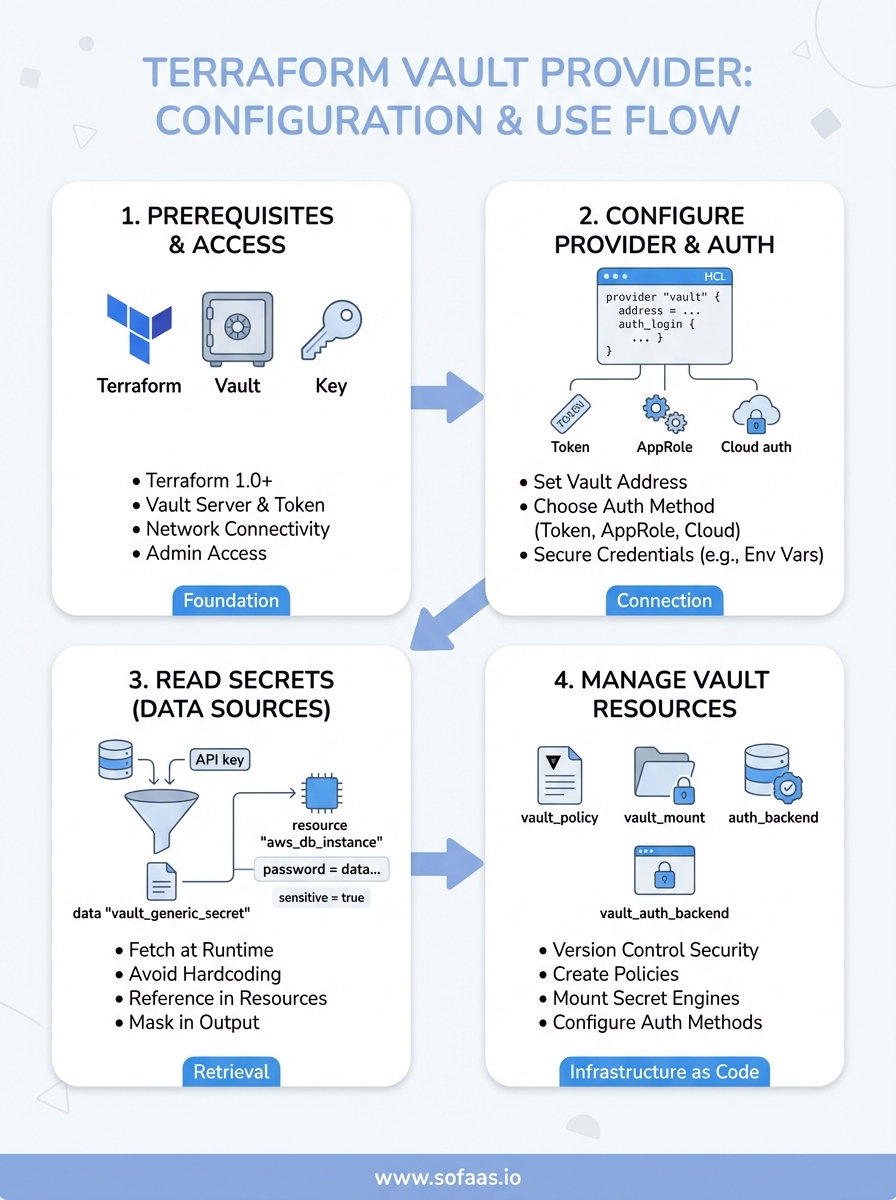
What you need before you start
You need a working Terraform installation and access to a Vault instance before configuring the terraform vault provider. This setup requires specific versions and permissions to function correctly. Missing any prerequisite will block your ability to complete the configuration steps in this guide.
Software and access requirements
Your environment needs these components installed and accessible:
- Terraform 1.0 or higher with working CLI access
- HashiCorp Vault server (self-hosted or Vault Cloud) with network connectivity from your Terraform execution environment
- Vault token or authentication credentials with appropriate policy permissions to read secrets and create resources
- Terminal access to run Terraform commands and verify Vault connectivity
- Network firewall rules configured to allow HTTPS traffic to your Vault instance (typically port 8200)
You also need administrative access to create Vault policies if you plan to manage Vault resources through Terraform. Without proper policy permissions, authentication will fail when you attempt to read or write secrets.
The Vault token you use must have both read and write permissions on the specific secret paths your Terraform configuration will access.
Knowledge you should have
Understanding basic Terraform syntax and workflow makes this configuration process straightforward. You should know how to write provider blocks, manage state files, and run terraform init, plan, and apply commands.
Familiarity with Vault concepts like secret engines, policies, and authentication methods helps you design better configurations. You don't need to be a Vault expert, but knowing the difference between KV secrets and dynamic secrets prevents common mistakes. Healthcare applications often use both types: static credentials for third-party APIs and dynamic database passwords that rotate automatically.
Step 1. Configure Vault access and provider auth
Connecting Terraform to Vault requires a provider block with authentication credentials and the Vault server address. You configure this in your main Terraform file, typically named main.tf or providers.tf. The terraform vault provider authenticates to your Vault instance before executing any resource or data operations.
Set up the provider block
Your provider configuration needs the Vault address and authentication method specified. The simplest approach uses a Vault token, though other methods like AppRole or Kubernetes authentication work for production environments.
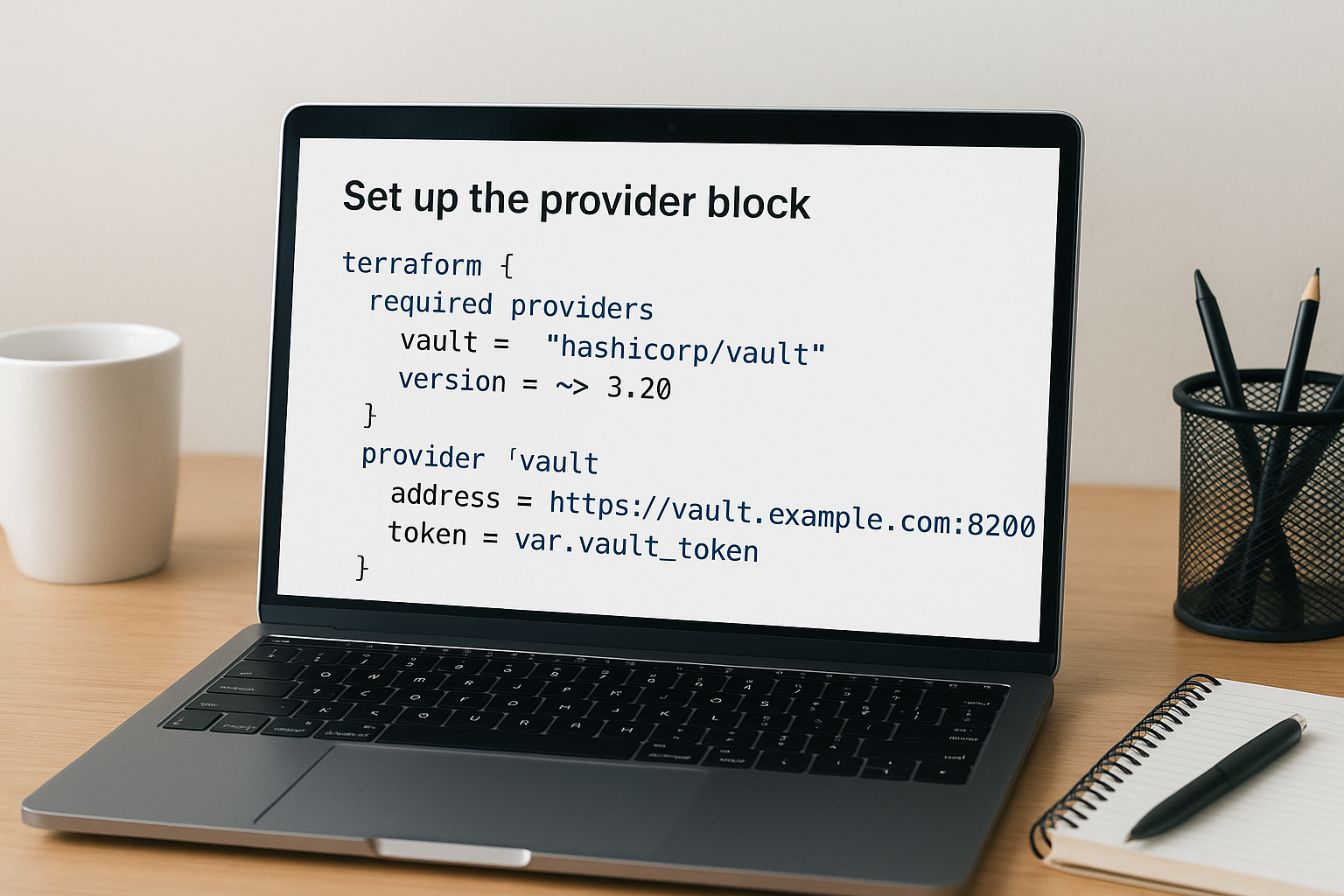
terraform {
  required_providers {
    vault = {
      source  = "hashicorp/vault"
      version = "~> 3.20"
    }
  }
}

provider "vault" {
  address = "https://vault.example.com:8200"
  token   = var.vault_token
}
Store your token in a Terraform variable rather than hardcoding it directly in the provider block. This prevents credential exposure in version control.
Never commit Vault tokens or other sensitive credentials to your Git repository, even in private repos.
Choose your authentication method
Production deployments should use AppRole or cloud-based authentication instead of static tokens. AppRole provides machine-to-machine authentication with role-based access control.
provider "vault" {
  address = "https://vault.example.com:8200"

  auth_login {
    path = "auth/approle/login"

    parameters = {
      role_id   = var.role_id
      secret_id = var.secret_id
    }
  }
}
Step 2. Read secrets from Vault in Terraform
Reading secrets from Vault into your Terraform configurations uses data sources rather than resources. The terraform vault provider provides data blocks that fetch secret values at runtime and make them available to your infrastructure code. You retrieve these secrets without storing them in your state file in plaintext when configured properly.
Use data sources to fetch secrets
Data sources query Vault for existing secrets stored in key-value secret engines. You specify the path where your secret lives and the version of the secret engine.
data "vault_generic_secret" "database" {
  path = "secret/data/production/database"
}

resource "aws_db_instance" "main" {
  allocated_storage = 20
  engine            = "postgres"
  instance_class    = "db.t3.micro"
  username          = data.vault_generic_secret.database.data["username"]
  password          = data.vault_generic_secret.database.data["password"]
}
Store all sensitive credentials in Vault rather than Terraform variables to prevent accidental exposure in logs or state files.
Reference secrets in resources
Access secret values using the data attribute followed by the key name. Each secret retrieved from Vault becomes available as a map that you reference throughout your configuration.
data "vault_generic_secret" "api_keys" {
  path = "secret/data/integrations/ehr"
}

output "endpoint" {
  value     = "https://api.example.com"
  sensitive = false
}
Mark outputs containing secrets as sensitive = true to prevent Terraform from displaying them in console output.
Step 3. Manage Vault with Terraform resources
Managing Vault itself through Terraform lets you version control your security infrastructure alongside your application code. The terraform vault provider includes resources for creating policies, mounting secret engines, and configuring authentication methods. You provision these Vault components the same way you provision cloud infrastructure.
Create policies and secret engines
Vault policies control access to secrets through path-based permissions. You define these policies as Terraform resources to maintain consistent security rules across environments.

resource "vault_policy" "app_reader" {
  name = "app-reader-policy"

  policy = <<EOT
path "secret/data/production/*" {
  capabilities = ["read", "list"]
}
EOT
}

resource "vault_mount" "kvv2" {
  path        = "secret"
  type        = "kv"
  options     = { version = "2" }
  description = "KV Version 2 secret engine"
}
Configure authentication backends and roles through Terraform to automate your identity and access management setup.
Managing Vault configuration through code prevents drift between environments and provides an audit trail for security changes.
Step 4. Run safely in CI and avoid common traps
Running the terraform vault provider in CI/CD pipelines requires secure credential injection and proper state management. Your pipeline needs Vault authentication without exposing tokens in build logs or environment variables that persist after execution.
Secure Vault credentials in CI
Use your CI platform's secret management features rather than hardcoded tokens. GitHub Actions, GitLab CI, and Jenkins all provide native secret storage that injects credentials at runtime.
# GitHub Actions example
- name: Terraform Apply
  env:
    VAULT_ADDR: ${{ secrets.VAULT_ADDR }}
    VAULT_TOKEN: ${{ secrets.VAULT_TOKEN }}
  run: |
    terraform init
    terraform apply -auto-approve
Configure short-lived tokens with exactly the permissions your pipeline needs. Tokens that expire after 1 hour limit exposure if your CI logs leak.
Production pipelines should use AppRole authentication with secret_id rotation instead of long-lived tokens.
Avoid these configuration mistakes
Never store Vault tokens in Terraform state files or pass them through command-line arguments that appear in process lists. Use environment variables or CI secret injection exclusively.
Watch for state file exposure when using remote backends. Ensure your Terraform state backend encrypts data at rest and restricts access to authorized service accounts only.
Next steps
You now have the foundation to implement the terraform vault provider in your infrastructure workflow. Start by connecting Terraform to your Vault instance using token authentication, then progress to AppRole for production deployments. Test your configuration in a development environment before applying changes to production systems.
Build a library of reusable Terraform modules that abstract Vault secret retrieval patterns. Your team will reference these modules across multiple projects, reducing duplication and standardizing security practices. Consider creating modules for database credentials, API keys, and OAuth tokens specific to your application requirements.
Healthcare applications need secure credential management from day one. If you're building SMART on FHIR integrations that connect to EHR systems, launch your application with VectorCare to get production-ready infrastructure including automated secret management, compliance controls, and OAuth handling built in. Focus on your application logic while the platform handles security infrastructure.
The Future of Patient Logistics
Exploring the future of all things related to patient logistics, technology and how AI is going to re-shape the way we deliver care.
Thank you! Your submission has been received!
Oops! Something went wrong while submitting the form.