SOC 2 Compliance Checklist: Step-By-Step Audit Guide 2026

SOC 2 Compliance Checklist: Step-By-Step Audit Guide 2026
If you're building healthcare applications that handle patient data, your enterprise prospects will ask one question before anything else: "Are you SOC 2 compliant?" Without that certification, deals stall, partnerships fall through, and your product stays locked out of the organizations that need it most. A comprehensive SOC 2 compliance checklist turns an otherwise chaotic audit process into a manageable project with clear milestones.
The challenge? SOC 2 preparation involves dozens of security controls, policy documents, and technical implementations that must work together seamlessly. Many organizations underestimate the scope and find themselves scrambling weeks before their audit window, discovering gaps that could have been addressed months earlier with proper planning.
At SoFaaS, we built our healthcare data integration platform on SOC 2 Type II compliant infrastructure because our customers, healthcare innovators connecting to EHR systems, depend on us to meet the strictest security standards. We've been through the audit process ourselves and understand exactly what it takes to get certified. This guide breaks down every step you need to follow, from defining your audit scope to collecting evidence and working with your auditor, so you can achieve compliance without the guesswork.
What a SOC 2 checklist should cover in 2026
A complete SOC 2 compliance checklist must account for every control, policy, and piece of evidence your auditor will examine during the engagement. The requirements haven't changed dramatically in 2026, but auditors now expect more mature security practices, especially around cloud infrastructure, third-party risk management, and incident response. Your checklist needs to reflect not just the minimum standards but the practical reality of how modern organizations protect customer data.
Five trust services criteria you can choose from
The American Institute of CPAs (AICPA) defines five trust services criteria that form the foundation of any SOC 2 audit. Security is mandatory for every organization pursuing certification, while the other four criteria (Availability, Processing Integrity, Confidentiality, and Privacy) are optional depending on your business needs and customer requirements. Healthcare organizations typically select Security, Availability, and Confidentiality because these directly address the concerns of hospital systems and health plans evaluating your platform.

You select criteria based on what matters most to your customers and what your system actually does. If you promise 99.9% uptime in your contracts, you need Availability in scope. If you process protected health information under business associate agreements, Confidentiality becomes essential. Privacy applies when you collect personally identifiable information for your own purposes, not just on behalf of customers.
Choosing the wrong trust services criteria at the start forces you to either expand your audit scope mid-process or explain to prospects why you didn't certify for the controls they care about.
Pre-audit preparation components
Your checklist must include a comprehensive risk assessment that identifies every system, application, and third-party vendor that touches customer data. This assessment drives everything else because you can't write controls for risks you haven't identified. Document your entire technology stack, from cloud providers like AWS or Azure to monitoring tools, logging services, and authentication systems.
Policy documentation forms another critical checklist category. You need written policies for information security, access control, incident response, change management, vendor management, and business continuity. Each policy must specify who owns it, when you last reviewed it, and how often you update it. Auditors will verify that your actual practices match what your policies describe, so generic templates from the internet create more problems than they solve.
Evidence collection requirements
Evidence collection represents the most time-consuming part of SOC 2 preparation. Your checklist should break down evidence requirements by control domain so you can assign collection tasks to specific team members. For access control, you'll need user access reviews showing quarterly attestations from managers, screenshots of role-based permissions in your systems, and logs proving you deactivated accounts within 24 hours of employee terminations.
System logs become crucial evidence, particularly for security monitoring and incident detection controls. You need to demonstrate that your SIEM or logging platform captures authentication events, configuration changes, and suspicious activities. Store these logs for the entire audit period (three to twelve months depending on Type 1 or Type 2) and ensure they're immutable so auditors can trust their integrity.
Timeline and resource planning
A realistic SOC 2 checklist includes specific timeframes for each preparation phase. Plan at least four to six months for a first-time Type 1 audit, allowing time to write policies, implement controls, collect evidence, and remediate any gaps your readiness assessment uncovers. Type 2 audits require an observation period of three, six, or twelve months where your controls must operate consistently, so you'll need at least that long plus two to three months for preparation.
Resource allocation matters just as much as timeline planning. Assign a dedicated project manager to coordinate across teams and track progress against your checklist. Budget for consultant fees if your team lacks SOC 2 experience, auditor costs (typically $15,000 to $50,000 depending on scope), and security tool purchases if you discover gaps in your monitoring or access control capabilities.
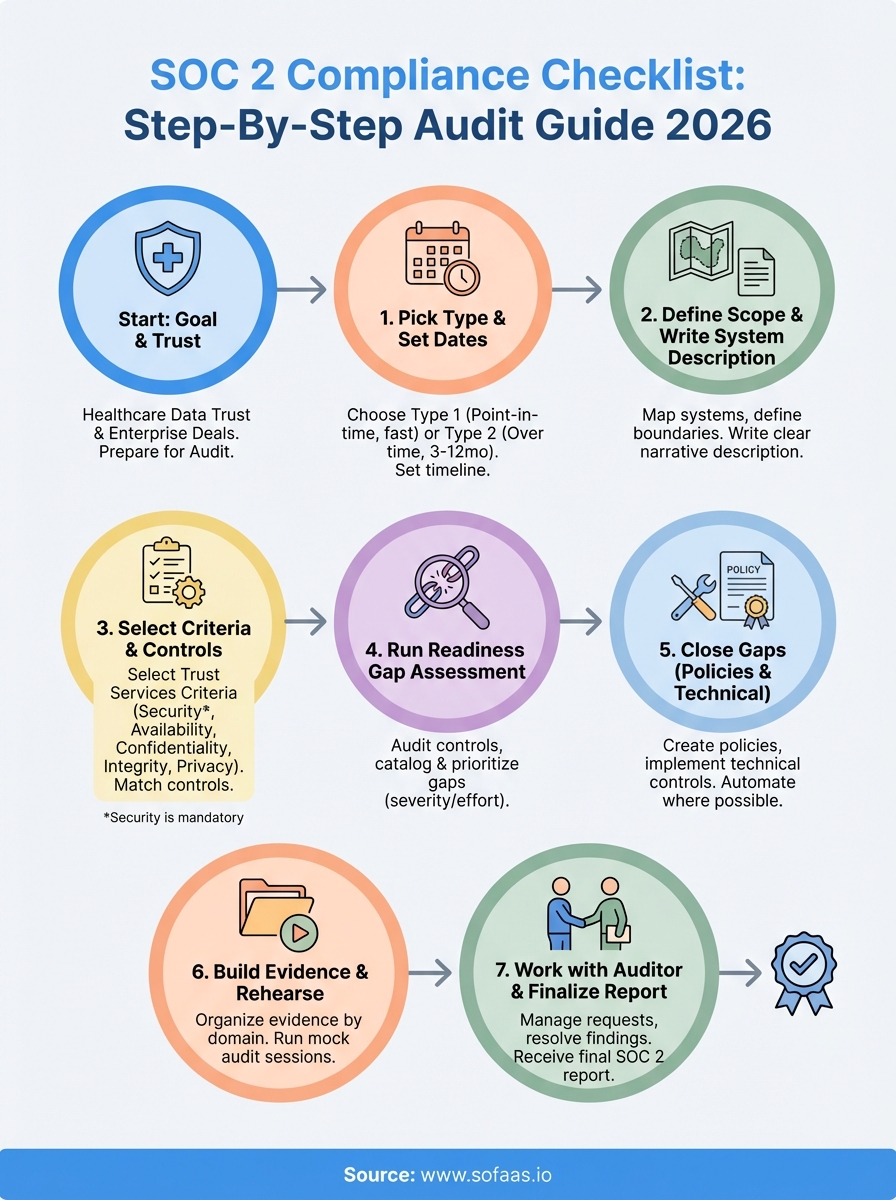
Step 1. Pick Type 1 or Type 2 and set dates
Your first decision shapes every other step in your SOC 2 compliance checklist: choosing between Type 1 and Type 2 audit formats. This choice determines your timeline, resource requirements, and the depth of evidence your auditor will examine. Type 1 assesses your controls at a single point in time, while Type 2 examines how consistently you operate those controls over three, six, or twelve months. Most enterprise customers and healthcare organizations require Type 2 because it proves you maintain security practices continuously, not just during an audit snapshot.
Understanding Type 1 vs Type 2 differences
Type 1 audits verify that you designed your security controls appropriately and that they existed on a specific date. Your auditor reviews your policies, examines your infrastructure configuration, and confirms you implemented the controls you documented. This audit takes four to eight weeks to complete once you begin the engagement, making it faster and less expensive than Type 2. Healthcare startups often use Type 1 as a stepping stone, demonstrating basic security maturity to early customers before committing to the longer Type 2 process.
Type 2 audits require operating effectiveness evidence that proves your controls worked consistently throughout the observation period. You'll provide logs showing quarterly access reviews, incident response tickets demonstrating you followed your procedures, and change management records proving you tested updates before deploying to production. The observation period you select (three, six, or twelve months) depends on customer requirements and your own readiness. Choose three months for your first Type 2 audit to minimize the risk window while gaining experience with evidence collection processes.
| Audit Type | Timeline | Evidence Scope | Typical Cost | Best For |
|---|---|---|---|---|
| Type 1 | 4-8 weeks | Point-in-time | $15,000-$25,000 | Early-stage validation |
| Type 2 (3 months) | 5-6 months total | Quarterly evidence | $25,000-$40,000 | First-time certification |
| Type 2 (12 months) | 14-15 months total | Annual evidence | $35,000-$50,000 | Renewal audits |
Setting realistic audit dates
Work backward from when you need the report in hand to set your audit start date and observation period. If enterprise prospects require SOC 2 certification by October 1st, you need your final report by mid-September to allow for delivery and review time. Subtract your observation period (three months minimum for Type 2), then add two months for audit fieldwork and report drafting. This calculation means you'd start your observation period in April and begin auditor engagement activities in February.
Setting unrealistic timelines creates pressure that leads to incomplete evidence collection and failed control testing, potentially delaying your certification by months.
Your SOC 2 compliance checklist should include specific milestone dates: readiness assessment completion, observation period start, evidence collection deadlines, auditor kickoff meeting, fieldwork completion, and final report delivery. Build buffer time into each phase because you'll inevitably discover gaps that require remediation. Share these dates with your executive team and board so they understand the investment required and can hold teams accountable for meeting deadlines.
Step 2. Define scope and write the system description
Your audit scope determines which systems, applications, and data flows your auditor will examine, directly impacting the complexity and cost of your certification. Narrowing scope too much creates a SOC 2 report that doesn't cover the systems your customers care about, while defining scope too broadly forces you to document and test controls for internal tools that never touch customer data. You need to draw clear boundaries around the infrastructure and processes that support your customer-facing services.
Mapping your in-scope systems and boundaries
Start by listing every system component that stores, processes, or transmits customer data. For a healthcare application like SoFaaS, this includes your production database servers, API gateways, authentication services, encryption key management systems, and backup storage. Your audit scope should extend to third-party services that handle customer data, such as your cloud hosting provider, monitoring tools, and logging platforms.

Document the data flow from when customer data enters your system until it leaves or gets deleted. This mapping reveals dependencies you might overlook, like the message queue that routes patient records between services or the CDN that caches API responses. Exclude internal systems that never interact with customer data, such as your HR management platform or accounting software, unless they store credentials that could compromise production environments.
Clearly defined boundaries prevent scope creep during your audit and help auditors understand exactly what they need to test.
Create a system boundary diagram showing all in-scope components, their connections, and where customer data flows. Label each component with its owner, whether it's managed internally or by a vendor, and what type of data it handles. This diagram becomes part of your system description and helps auditors visualize your architecture quickly.
Writing a clear system description
Your system description provides the narrative context that auditors need to understand your business, technology stack, and security controls. This document typically runs 15 to 30 pages and includes sections on company background, service offerings, infrastructure architecture, data classification, and control environment. Write this description in plain language, avoiding marketing copy or overly technical jargon that obscures how your system actually works.
The infrastructure section should specify your cloud providers, data center locations, network architecture, and technology stack. Describe your deployment model (containerized applications, serverless functions, traditional virtual machines), how you segment environments (development, staging, production), and where you store customer data geographically. Healthcare organizations particularly care about data residency, so explicitly state which AWS regions or Azure availability zones host patient information.
Include a section on personnel and organizational structure that identifies who manages security controls, who approves access requests, and who responds to incidents. Your auditor needs to know whether you have dedicated security staff or if developers handle security responsibilities alongside their regular duties. This transparency helps them assess whether you have adequate resources to maintain your control environment throughout your SOC 2 compliance checklist journey.
Step 3. Select trust services criteria and controls
Selecting the right trust services criteria directly impacts your audit scope, cost, and how well your SOC 2 report addresses customer requirements. You already know that Security is mandatory for every audit, but the other four criteria (Availability, Confidentiality, Processing Integrity, and Privacy) become optional choices based on your business model and customer commitments. Healthcare organizations evaluating your platform will expect certain criteria based on the data you handle and the service levels you promise in contracts.
Matching criteria to customer requirements and contractual commitments
Your SOC 2 compliance checklist should include a review of every customer contract, master service agreement, and business associate agreement you've signed. Look for language that commits you to specific uptime targets, which signals you need Availability in scope. When contracts reference data confidentiality, encryption requirements, or restricted access to protected health information, you need the Confidentiality criterion. Processing Integrity applies when you guarantee accuracy of data processing outputs, while Privacy covers how you collect and use personal information for your own purposes.
Call five to ten of your largest customers or prospects and ask directly which trust services criteria they require in SOC 2 reports from vendors. Many enterprises maintain vendor security assessment programs with specific certification requirements documented in their procurement policies. This research prevents you from completing an audit that doesn't meet buyer needs.
Selecting criteria based solely on what seems easiest rather than what customers require creates a report that doesn't open the doors you need it to open.
Mapping controls to your selected criteria
Once you identify your required criteria, you need to select specific controls that demonstrate compliance with each one. The AICPA provides common criteria mappings in the 2017 Trust Services Criteria document, which lists control objectives for each criterion. For Security, you'll implement controls around access management, encryption, network security, and incident response. Availability requires controls for system monitoring, capacity planning, and disaster recovery.
Build a control matrix that maps each control to its corresponding criterion and identifies who owns implementation and evidence collection:
| Control ID | Control Description | Criteria | Owner | Evidence Type |
|---|---|---|---|---|
| AC-1 | User access reviews quarterly | Security | IT Manager | Access review attestations |
| AC-2 | Terminate access within 24 hours | Security | IT Manager | Audit logs, HR tickets |
| AV-1 | Monitor system uptime 24/7 | Availability | DevOps Lead | Monitoring dashboards |
| CF-1 | Encrypt data at rest using AES-256 | Confidentiality | Security Engineer | Configuration screenshots |
| CF-2 | Enforce TLS 1.2+ for data in transit | Confidentiality | DevOps Lead | Network configuration files |
Document the testing procedures your auditor will use for each control, including the evidence you'll provide and the sample size they'll examine. This preparation helps you collect the right evidence during your observation period and ensures you understand exactly what auditors will verify.
Step 4. Run a readiness gap assessment
A readiness assessment reveals exactly where your current security posture falls short of SOC 2 requirements before your auditor discovers those gaps during fieldwork. You conduct this internal evaluation by comparing your existing controls against the trust services criteria you selected in Step 3, documenting what works, what needs improvement, and what doesn't exist yet. This assessment saves time and money by catching problems early, when you still have months to fix them rather than scrambling days before your audit starts.
Auditing your current controls systematically
Start by reviewing each control in your matrix against your actual operational practices, not what your policies claim you do. For access control, pull your latest user access review and check when you last completed it. If your policy requires quarterly reviews but your last one happened eight months ago, you've identified a gap. Log into your production systems and verify that terminated employees no longer have active accounts, checking HR termination dates against account deactivation timestamps in your identity provider.
Test your technical controls directly by attempting actions that should fail. Try accessing production databases with a developer account that shouldn't have permissions, attempt to deploy code without going through your change management process, or see if you can disable logging on critical systems. Each successful bypass reveals a control that exists on paper but doesn't function properly. Document these findings with screenshots, log excerpts, and specific timestamps so you know exactly what needs fixing.
If you can't produce evidence for a control during your internal assessment, your auditor won't be able to verify it either, resulting in a qualified or failed audit.
Cataloging gaps by severity and effort
Create a gap tracking spreadsheet that lists each deficiency you discovered, which control it affects, the risk it creates, and how difficult it will be to remediate. Rate severity as high (critical security risks or missing mandatory controls), medium (important but not immediately dangerous), or low (documentation issues or minor process gaps). Estimate effort as quick wins (under two weeks), standard projects (one to two months), or major initiatives (three months or longer).
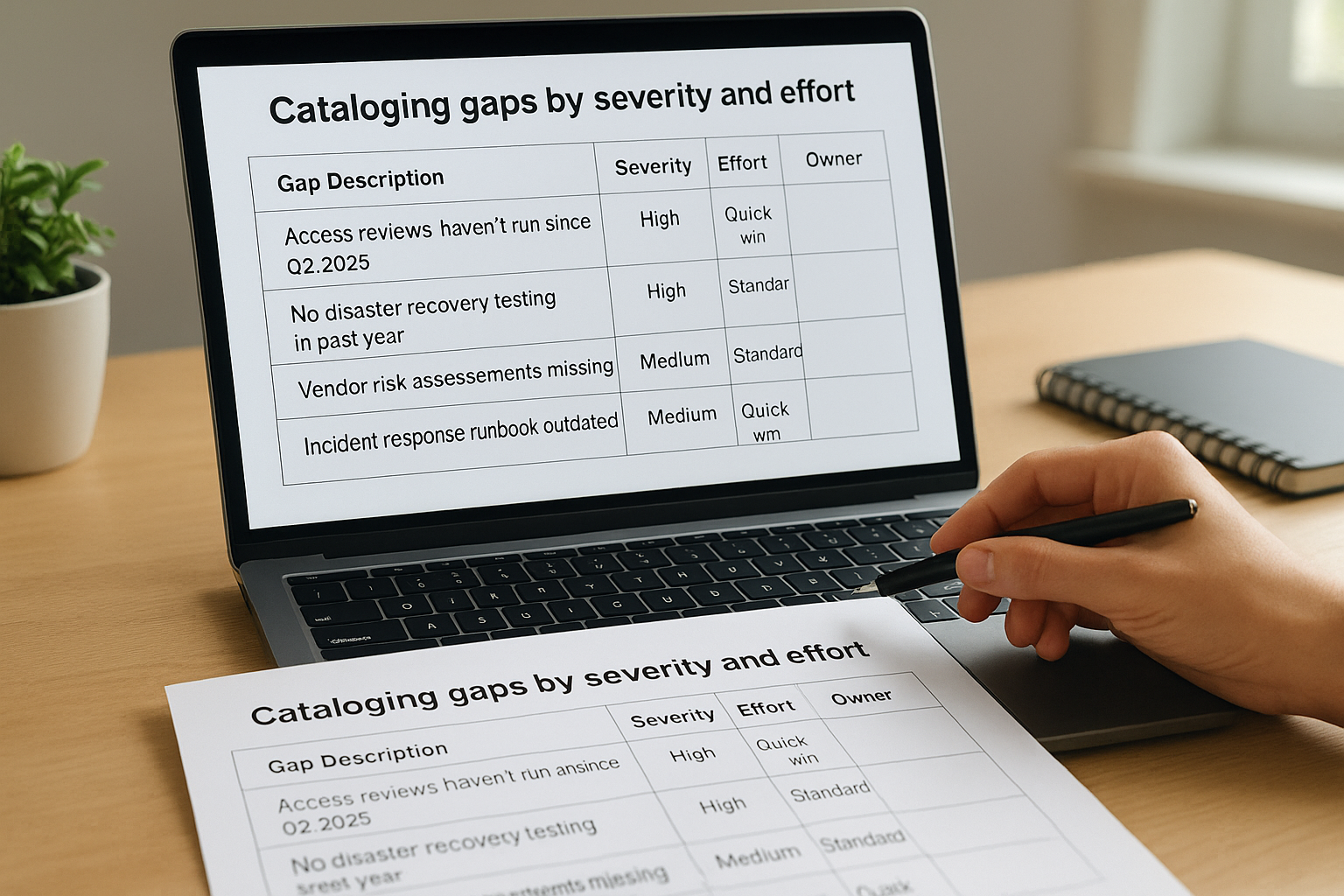
| Gap Description | Affected Control | Severity | Effort | Owner | Target Date |
|---|---|---|---|---|---|
| Access reviews haven't run since Q2 2025 | AC-1 | High | Quick win | IT Manager | March 1 |
| No disaster recovery testing in past year | BC-1 | High | Standard | DevOps Lead | April 15 |
| Vendor risk assessments missing | VM-1 | Medium | Standard | Procurement | April 30 |
| Incident response runbook outdated | IR-2 | Medium | Quick win | Security Engineer | March 15 |
Prioritize high-severity gaps that qualify as quick wins for immediate action. These represent the lowest-hanging fruit in your SOC 2 compliance checklist and demonstrate progress quickly. Schedule standard and major projects based on your audit timeline, ensuring you complete all high-severity items at least one month before your observation period ends to collect evidence of their operation.
Step 5. Close gaps with policies and technical controls
Remediation work transforms your gap assessment findings into actual controls that will pass auditor testing. You need to tackle both policy documentation and technical implementation, addressing high-severity gaps first before moving to lower-priority items. This phase typically consumes two to four months of your SOC 2 compliance checklist timeline, depending on how many gaps you discovered and the complexity of your infrastructure.
Creating policy documents that auditors accept
Your policies need to describe specific procedures with clear ownership, not vague commitments to follow best practices. An effective access control policy states that managers review user permissions quarterly using your identity management system, submit attestations to the security team within five business days, and that IT revokes unnecessary access within 24 hours of receiving those attestations. This specificity tells auditors exactly what evidence to look for and gives your team concrete steps to follow.
Write each policy using this standard template structure:
1. Purpose: Why this policy exists and what it protects
2. Scope: Which systems, data, and personnel it covers
3. Policy Owner: Who maintains and enforces this policy
4. Procedures: Step-by-step instructions for compliance
5. Roles and Responsibilities: Who does what
6. Exceptions: How to request and approve deviations
7. Review Schedule: How often you update this policy
8. Approval: Who approved it and when
Assign each policy to an owner who actually performs that function in your organization. Your DevOps lead should own the change management policy because they already manage deployments. Your security engineer owns the incident response policy because they coordinate security events. This alignment ensures policies reflect real operational practices rather than aspirational procedures nobody follows.
Policies that don't match your actual operations create findings during your audit when auditors discover the gap between documentation and practice.
Implementing technical controls systematically
Technical controls require infrastructure changes, tool purchases, or configuration updates that take longer than writing policies. Deploy a centralized logging solution that captures authentication events, system changes, and application errors across your entire environment. Configure your SIEM to retain logs for at least 13 months (covering your observation period plus buffer time) and ensure log files are immutable to satisfy auditor integrity requirements.
Automate controls wherever possible to eliminate human error and simplify evidence collection. Set up automated user access reviews that email managers quarterly with current permissions for their direct reports, capturing their approval responses in an audit trail. Configure your identity provider to disable accounts automatically when HR marks employees as terminated in your HRIS system. These automated controls generate consistent evidence without requiring manual intervention each quarter.
Test each control after implementation by simulating the conditions your auditor will examine. Attempt to access production with an expired account, try to deploy code without proper approvals, or verify that your monitoring system alerts on suspicious login patterns. Document these tests with screenshots and timestamps to prove your controls work as designed.
Step 6. Build evidence and rehearse the audit
Evidence collection represents the difference between a smooth audit and a chaotic scramble where you hunt for screenshots and logs while your auditor waits. You need to organize every piece of evidence your SOC 2 compliance checklist requires into a structured repository that maps directly to your control matrix. Start this collection at the beginning of your observation period, gathering artifacts as they occur rather than trying to reconstruct them months later when memories fade and systems might have changed.
Organizing evidence by control domain
Create a folder structure that mirrors your control matrix exactly, with subdirectories for each trust services criterion and individual folders for each control. Your access control evidence folder should contain quarterly access review spreadsheets, manager attestation emails, account termination logs, and screenshots showing role-based permissions in your systems. Date stamp every file using a consistent format (YYYY-MM-DD-description.pdf) so auditors can quickly identify when you collected each artifact.

Build an evidence tracking spreadsheet that lists every control, the evidence types you need, collection frequency, responsible party, and completion status:
| Control | Evidence Required | Frequency | Owner | Q1 Status | Q2 Status |
|---|---|---|---|---|---|
| AC-1 | Access review attestations | Quarterly | IT Manager | Complete | Complete |
| AC-2 | Termination logs | Per event | IT Manager | 3 collected | 2 collected |
| CM-1 | Change approval tickets | Per release | DevOps Lead | 12 collected | 8 collected |
| IR-1 | Incident response records | Per incident | Security Engineer | 1 collected | 0 incidents |
Collect native artifacts rather than summaries or reformatted documents whenever possible. Your auditor wants to see actual JIRA tickets showing change approvals, original CloudWatch logs proving you detected incidents, and unmodified screenshots from your identity provider showing permission settings. Recreating or editing evidence after the fact creates authenticity questions that delay your audit.
Running practice audit sessions
Schedule mock interviews with each control owner six to eight weeks before your audit starts. Ask them to walk you through how they perform their control, show you where evidence lives, and explain any exceptions or unusual circumstances from your observation period. These rehearsals reveal gaps in documentation or understanding that you can fix before your auditor discovers them.
Practice sessions expose team members who don't understand their controls or can't locate required evidence, giving you time to train them properly.
Prepare your team for common auditor questions by sharing this practice list: "How often do you perform this control? Where do you document results? What happens if you discover an issue? Who reviews your work? How do you know this control is effective?" Control owners who can answer these questions confidently without referring to policy documents demonstrate operational maturity that auditors value.
Test your evidence repository by having someone outside your security team attempt to find specific artifacts using only your folder structure and naming conventions. If they struggle to locate a quarterly access review or a specific change approval, your auditor will face the same confusion, wasting valuable time during fieldwork.
Step 7. Work with your auditor and finalize the report
Your auditor relationship shifts from preparation to execution once fieldwork begins, requiring daily coordination and rapid evidence delivery to keep the engagement on schedule. You'll spend two to four weeks answering questions, clarifying controls, and walking auditors through your systems while they test whether your security practices match what you documented. This phase represents the final validation of all the work you completed in your SOC 2 compliance checklist, with your auditor serving as the independent third party who verifies your claims to customers.
Managing auditor information requests
Auditors will send you evidence requests through a secure portal, typically requesting 20 to 50 specific artifacts organized by control domain. Each request specifies the control being tested, the evidence types needed, and the timeframe they want to examine. Assign these requests immediately to the control owners you identified in your evidence tracking spreadsheet, setting 24-hour response deadlines to prevent backlogs that delay your audit completion.
Create a standard response template for your team to use when submitting evidence:
Control ID: AC-1 (Quarterly Access Reviews)
Evidence Submitted: Q1-2025-access-review.xlsx, Q2-2025-access-review.xlsx
Time Period Covered: January 1, 2025 - June 30, 2025
Notes: Manager attestations included in Column F. Three exceptions documented
in "Exceptions" tab with security team approval emails attached.
Contact for Questions: [Name, Email, Phone]
Schedule daily 15-minute standup calls with your auditor to review outstanding requests, clarify confusing controls, and address any issues they discovered during testing. These frequent touchpoints prevent misunderstandings that could result in findings and keep both teams aligned on progress toward your completion target.
Resolving findings before report issuance
Your auditor will identify findings when controls don't operate as designed or evidence doesn't support your claims. Findings fall into three categories: deficiencies (control failures), observations (areas for improvement), and management responses (your explanation of how you'll fix issues). You'll receive a preliminary findings list one to two weeks before your final report, giving you time to provide additional context or remediate problems.
Draft management responses that acknowledge the issue, explain root causes without making excuses, and outline specific remediation steps with completion dates. Strong responses demonstrate accountability and commitment to improvement, which reassures customers reviewing your report that you take security seriously.
Auditors can modify their findings based on new evidence or compelling management responses, so treating preliminary findings as negotiable rather than final often improves your report outcome.
Review your draft report line by line, verifying that your system description accurately reflects your current infrastructure, trust services criteria match what you selected, and testing procedures correctly describe your controls. Check that dates align with your observation period and that your organization's legal name appears consistently throughout. Request corrections immediately for any inaccuracies before your auditor issues the final report, which typically arrives five to seven business days after you approve the draft.
Wrap-up and next steps
You now have a complete SOC 2 compliance checklist that breaks down the certification process into manageable steps, from selecting your audit type to finalizing your report. The key to success lies in starting early, documenting everything, and treating compliance as an ongoing operational practice rather than a one-time project. Most organizations underestimate the time required for evidence collection and gap remediation, so build buffer time into every phase of your timeline.
Your next immediate action should be scheduling a readiness assessment to identify gaps before they become audit findings. Contact auditors for preliminary cost estimates and timeline discussions, then work backward from your target completion date to set milestones. If you're building healthcare applications that integrate with EHR systems, remember that compliance doesn't have to slow you down. Launch your Smart on FHIR app on infrastructure that's already SOC 2 Type II certified, letting you focus on product development while we handle the security foundation your customers require.
The Future of Patient Logistics
Exploring the future of all things related to patient logistics, technology and how AI is going to re-shape the way we deliver care.
Thank you! Your submission has been received!
Oops! Something went wrong while submitting the form.