HIPAA Compliance Checklist: 10 Steps to Full Compliance in 2026

You're building a healthcare app or running a health tech company, and someone just asked, "Are we actually HIPAA compliant?" If you hesitated before answering, you're not alone. Most teams know they need to protect patient data, but few have a clear, structured hipaa compliance checklist they can point to when auditors, partners, or customers ask for proof.
This article gives you exactly that. We break down the hipaa compliance requirements checklist into 10 concrete steps, covering everything from risk assessments and access controls to breach notification procedures and vendor agreements. No vague guidance, no legal jargon you need a lawyer to translate. Just the specific actions your organization needs to take in 2026.
We built this checklist from real integration work with EHR systems like Epic and Cerner, where compliance failures aren't hypothetical, they're deal-breakers. Whether you're a startup connecting to patient records for the first time or a growing company tightening up existing processes, this it hipaa compliance checklist will show you exactly where you stand and what to fix next.
1. Determine if you're a covered entity or business associate
Every hipaa compliance checklist starts here, because the rules that apply to you depend entirely on your role in the healthcare data chain. Get this classification wrong and you'll either over-invest in controls you don't need or, worse, miss obligations that leave you exposed. This is the foundation step that shapes everything else on this checklist for hipaa compliance.

What this step involves
Under HIPAA, organizations fall into one of two main categories: covered entities and business associates. Covered entities include health plans, healthcare clearinghouses, and providers who transmit health information electronically for billing or claims. Business associates are vendors, contractors, or subcontractors who create, receive, maintain, or transmit protected health information (PHI) on behalf of a covered entity. If your app connects to EHR systems like Epic or Cerner to pull patient records, you're almost certainly a business associate, and that status carries its own set of contractual and regulatory duties.
| Role | Examples | Primary Obligation |
|---|---|---|
| Covered Entity | Hospitals, physician practices, health insurers | Direct compliance with Privacy and Security Rules |
| Business Associate | Billing companies, cloud hosts, health tech vendors | Compliance via Business Associate Agreement (BAA) |
| Subcontractor | Vendors serving a business associate | Same BAA obligations, one level removed |
Why it matters for compliance
Misclassifying yourself is one of the most common and costly mistakes in healthcare tech. The Department of Health and Human Services (HHS) treats business associates as directly liable for HIPAA violations, not just the covered entities they serve. That means a startup building a patient portal or a remote monitoring tool can face the same enforcement actions and civil penalties as a hospital if PHI is mishandled.
Your compliance obligations start the moment you touch PHI, not the moment someone asks about them.
Getting this wrong early also creates downstream problems. Partners and EHR vendors will ask you to prove your status before granting API access or signing agreements. If you can't clearly state whether you're a covered entity, business associate, or subcontractor, you'll stall integration timelines and lose credibility with technical and legal teams on the other side of the table.
How to implement it
Start by mapping every point where your organization touches health information, whether you're collecting it directly from patients, receiving it from a partner, or processing it through a third-party API. Then work through this quick self-assessment:
- Do you provide healthcare services directly to patients and bill insurance or Medicare/Medicaid? You're likely a covered entity.
- Do you handle PHI on behalf of a covered entity, such as processing claims, hosting data, or providing software that touches patient records? You're a business associate.
- Do you work for another business associate, like a subcontractor providing cloud infrastructure or analytics? You inherit business associate obligations too.
- Do you only handle de-identified or aggregate data with no way to re-identify individuals? You may fall outside HIPAA's scope entirely, though you should confirm this with legal counsel.
Document your conclusion in writing, including the reasoning behind it, because this becomes part of your compliance record if you're ever audited. Review the official HHS guidance on covered entities and business associates to confirm your interpretation matches current regulatory definitions, since misclassification often stems from outdated assumptions rather than intentional error. If you're integrating with EHR systems and unsure how classification affects your technical setup, platforms like SoFaaS handle the compliance groundwork for business associates connecting to Epic, Cerner, and Allscripts, so you're not guessing at obligations while building your product.
2. Appoint a HIPAA privacy officer and security officer
Once you know your classification, the next item on any hipaa compliance checklist is naming actual people to own the program. HIPAA doesn't let compliance live as a shared responsibility with no clear owner. It requires named individuals accountable for privacy policy and information security, and skipping this step is one of the fastest ways to fail an audit.
What this step involves
HIPAA's Privacy Rule requires you to designate a privacy officer responsible for developing and enforcing policies around PHI use and disclosure. The Security Rule requires a security officer responsible for the technical and administrative safeguards protecting electronic PHI. These can be the same person at a small startup or two separate roles at a larger organization, but the responsibility has to sit with someone by name, not a department or a policy document. Their duties include writing and updating policies, training staff, handling patient rights requests, and serving as the point of contact during an investigation or breach.
Why it matters for compliance
Auditors and EHR partners will ask for this person by name early in any review, and "we handle it as a team" is not an acceptable answer. Without a designated officer, accountability disappears the moment something goes wrong, and HHS enforcement actions frequently cite the absence of a clear compliance owner as an aggravating factor in penalty decisions.
If no one owns HIPAA compliance by name, no one is actually accountable for it.
Beyond audits, this role matters operationally. When an EHR vendor like Epic or Cerner reviews your organization before granting API access, they want a named contact who understands your security posture and can answer specific questions about safeguards and incident response.
How to implement it
Formalize the appointment in writing, even at a five-person startup. A simple checklist for this step looks like:
- Name a privacy officer and document their responsibilities in a written job description.
- Name a security officer, distinct from the privacy officer if your team size allows it.
- Publish both roles internally so employees know who to contact with questions or concerns.
- Give each officer real authority to enforce policy, not just advise on it.
- Review the appointment annually or whenever there's a leadership change.
For smaller teams building on platforms like SoFaaS, the technical security burden around EHR connections is already handled by the platform's HIPAA-compliant infrastructure, which frees your security officer to focus on internal policy and staff training rather than building encryption and access controls from scratch.
3. Conduct a HIPAA risk assessment
With your officers in place, the next step in any hipaa compliance requirements checklist is finding out where your actual vulnerabilities live. A risk assessment isn't a formality you complete once and file away. It's the analytical work that tells you which safeguards you actually need, based on how your organization really stores, transmits, and processes PHI.
What this step involves
A HIPAA risk assessment means systematically identifying every place PHI lives in your systems, from databases and API integrations to email attachments and backup drives, then evaluating the threats and vulnerabilities tied to each. You're looking at three angles: what could go wrong (a lost laptop, a misconfigured API, a phishing attack), how likely it is, and how much damage it would cause if it happened. The output should be a documented risk register that ranks issues by severity and assigns a remediation plan to each one. HHS provides a Security Risk Assessment Tool that many small and mid-sized organizations use as a starting framework.
Why it matters for compliance
Skipping this step is one of the most frequently cited failures in HHS enforcement actions. Auditors don't just want to see that you have security controls, they want to see the analysis that justified choosing those specific controls over others. Without a documented assessment, you can't prove your safeguards match your actual risk profile, and that gap shows up immediately when regulators or EHR partners request evidence.
A risk assessment without documentation is just an opinion, not compliance evidence.
This matters even more for teams integrating with EHR systems, where the attack surface includes third-party APIs, OAuth tokens, and data in transit between systems you don't fully control.
How to implement it
Treat this as a recurring process, not a one-time checkbox. A practical approach looks like this:
- Inventory every system that stores, processes, or transmits PHI, including cloud services and third-party integrations.
- Identify threats and vulnerabilities for each system, from weak authentication to unpatched software.
- Assign risk levels based on likelihood and potential impact to patients and the organization.
- Document remediation plans with owners and deadlines for each identified risk.
- Repeat annually, or whenever you add a new system, vendor, or integration.
Organizations connecting to Epic, Cerner, or Allscripts through SoFaaS start this assessment with a smaller attack surface already, since the platform's audit logging, encryption, and access controls reduce the number of gaps you need to identify and remediate on your own.
4. Implement Privacy Rule policies and patient rights
Once your risk assessment tells you where PHI lives, the next step in your hipaa compliance list is making sure patients can actually exercise the rights HIPAA guarantees them. The Privacy Rule isn't just about locking data down, it's about giving individuals control over their own health information, and that requires written policies, not just good intentions.
What this step involves
The Privacy Rule gives patients specific rights: the right to access their records, request corrections, get an accounting of disclosures, and request restrictions on how their data gets shared. Your organization needs written policies covering each of these rights, plus a Notice of Privacy Practices that explains in plain language how you collect, use, and share PHI. You also need documented procedures for the "minimum necessary" standard, which limits PHI use and disclosure to only what's needed for a specific purpose.
Why it matters for compliance
Patient rights requests are one of the most common triggers for HHS complaints, and mishandling them draws scrutiny fast. If a patient requests their records and your team doesn't know the required response timeline or format, that gap becomes a compliance failure the moment it's reported. Regulators also expect your Notice of Privacy Practices to be current, accessible, and actually followed, not just a document sitting in a drawer since your last audit.
Patient rights aren't optional extras, they're the core of what the Privacy Rule protects.
For teams building apps that pull data from Epic or Cerner, this step also affects your OAuth consent flows, since patient authorization for data sharing has to align with how you've documented their rights internally.
How to implement it
Build this out with concrete, written artifacts rather than vague policy statements:
- Draft a Notice of Privacy Practices and make it available to every patient before or at first contact.
- Set response timelines for access requests (typically 30 days) and document who handles them.
- Create a correction request process so patients can dispute inaccurate records.
- Define your minimum necessary standard for each role that touches PHI internally.
- Log every disclosure so you can produce an accounting if a patient requests one.
Organizations building on SoFaaS get a head start here, since the platform's patient authorization and consent management for SMART on FHIR OAuth flows already handles the technical side of capturing and documenting patient consent during EHR data exchange.
5. Put administrative safeguards in place
Administrative safeguards are the policies and procedures that govern how your workforce actually handles PHI day to day. This step in the hipaa compliance checklist moves beyond naming officers and assessing risk into building the operational rules that keep your team from becoming the weak link. Without these safeguards written down, even a well-intentioned staff will make inconsistent decisions about access, sharing, and incident response.
What this step involves
Administrative safeguards cover workforce training, access management, sanction policies for violations, and contingency planning for emergencies like system outages or natural disasters. You need documented procedures for granting and revoking system access when employees join, change roles, or leave. You also need a formal sanction policy that spells out consequences for employees who violate PHI handling rules, plus a business continuity plan that addresses how PHI stays protected and available during a disruption. HHS breaks these requirements down in detail in its Security Rule guidance, which many organizations use as a baseline for policy language.
Why it matters for compliance
Administrative safeguards are where most breaches actually originate, not from sophisticated attacks but from a former employee retaining access, or a staff member sharing credentials to save time. Auditors specifically look for evidence that access controls tie directly to job function and that offboarding happens promptly. Without documented procedures, you can't demonstrate that access decisions were deliberate rather than accidental.
The strongest encryption in the world won't save you if a former employee still has a working login.
Insurers and EHR partners evaluating your organization also treat administrative safeguards as a proxy for overall maturity. A company that can't produce an access control policy raises questions about everything else it claims to have in place.
How to implement it
Build your administrative safeguards around these core policies:
- Role-based access control, granting PHI access only to staff whose job requires it.
- Onboarding and offboarding checklists that trigger access grants and revocations automatically.
- A written sanction policy with defined consequences for policy violations, reviewed with new hires.
- A contingency plan covering data backup, disaster recovery, and emergency access procedures.
- Periodic access reviews, at least quarterly, to catch stale permissions before they become liabilities.
For teams integrating with Epic, Cerner, or Allscripts, SoFaaS centralizes API access and token management, which simplifies the access control piece considerably since you're not managing separate credentials and permissions across multiple EHR connections manually.
6. Secure physical access to PHI
Digital security gets most of the attention, but a surprising number of HIPAA violations trace back to unlocked server rooms, unattended workstations, or a laptop left in a car. This step in the hipaa compliance checklist covers the physical world: the buildings, devices, and hardware where PHI actually lives outside of code and cloud dashboards.

What this step involves
Physical safeguards under the Security Rule require you to control who can physically reach the systems and devices that store or transmit PHI. That means locked server rooms, badge access to office areas where workstations display patient data, and clear policies for how devices like laptops, external drives, and printers get used, tracked, and eventually destroyed. You also need facility access controls that log who entered secure areas and when, plus a device and media disposal policy that ensures old hard drives or decommissioned servers never leave your building with recoverable PHI still on them.
Why it matters for compliance
Organizations sometimes assume that moving to the cloud eliminates physical risk entirely, but that's rarely true. Employees still work from laptops, print records for reference, or plug in USB drives for backups, and each of those touchpoints creates physical exposure. Auditors specifically check whether your device disposal procedures actually get followed, not just documented, because a discarded laptop with unencrypted PHI has caused real HHS enforcement actions.
A locked door and a wiped hard drive prevent more breaches than most people expect.
This matters just as much for remote teams. If your staff works from home offices, physical safeguards extend to their setups too, including screen privacy and secure storage for any printed materials.
How to implement it
Treat physical security as seriously as your firewall rules:
- Restrict facility access to server rooms and workstation areas using badges, keys, or PIN codes, and log entries.
- Position screens away from public view in any area where patient data might display.
- Enforce automatic screen locks on all devices after a short idle period.
- Create a device disposal policy that includes certified data wiping or physical destruction before hardware leaves your control.
- Extend policies to remote workers, covering home office setups and printed material storage.
Because SoFaaS hosts EHR connections and PHI processing on its own HIPAA-compliant infrastructure, teams building on the platform shrink their physical footprint considerably, since patient data moving between Epic, Cerner, or Allscripts never touches your local servers or office hardware in the first place.
7. Strengthen technical safeguards and IT security
Technical safeguards are where most engineering teams actually spend their time, and rightly so, because this is the layer where encryption, access controls, and authentication either hold up under attack or don't. This part of the it hipaa compliance checklist covers the code, configurations, and infrastructure decisions that determine whether PHI stays protected as it moves through your systems.

What this step involves
The Security Rule requires specific technical controls: encryption for PHI at rest and in transit, unique user IDs for anyone accessing systems, automatic logoff after inactivity, and audit controls that log who accessed what data and when. You also need authentication mechanisms strong enough to verify identity before granting access, which for most healthcare apps means multi-factor authentication rather than passwords alone. If your app connects to EHR systems, this extends to how you handle OAuth tokens, API keys, and the encrypted channels carrying patient data between your servers and systems like Epic or Cerner.
Why it matters for compliance
Technical safeguards are the controls auditors test most rigorously, because they're the ones attackers exploit most often. A misconfigured API endpoint or an unencrypted database backup can expose thousands of patient records in a single incident, and HHS enforcement history is full of cases where weak technical controls turned a minor gap into a reportable breach.
Encryption and access logs don't prevent every breach, but they determine whether you can prove what happened when one occurs.
EHR vendors also scrutinize technical safeguards specifically before granting API credentials. If your token management or encryption standards fall short of their requirements, you'll lose integration access regardless of how strong your other policies look on paper.
How to implement it
Build your technical stack around these non-negotiable controls:
- Encrypt PHI at rest using AES-256 or equivalent, and in transit using TLS 1.2 or higher.
- Require multi-factor authentication for any system accessing PHI, including internal admin tools.
- Enable audit logging that captures every access, edit, and deletion event tied to PHI.
- Automate session timeouts so idle connections don't stay open indefinitely.
- Rotate API keys and OAuth tokens regularly, and revoke them immediately when access ends.
For teams connecting to Epic, Cerner, or Allscripts, SoFaaS handles encryption, token rotation, and audit logging as part of its managed infrastructure, so you're not building these controls from scratch or hoping your OAuth implementation matches each EHR vendor's specific security expectations.
8. Manage business associate agreements and vendor risk
Your own safeguards only cover half the picture. The moment you share PHI with a vendor, a subcontractor, or a cloud provider, their security practices become your liability too. This step in the hipaa compliance checklist is about controlling that exposure through contracts and ongoing vendor oversight, not just trusting that partners handle data responsibly.
What this step involves
A business associate agreement (BAA) is a legally required contract between you and any vendor that creates, receives, maintains, or transmits PHI on your behalf. It spells out how the vendor must protect data, what happens if there's a breach, and the limits on how they can use PHI beyond the services you're paying for. You need a signed BAA before any PHI flows to a vendor, whether that's a cloud host, an analytics provider, a billing service, or a subcontractor supporting your EHR integration. Beyond the contract itself, you need a process for vetting vendor security practices before signing and periodically afterward.
Why it matters for compliance
HHS has fined organizations specifically for failing to have a BAA in place, even when the vendor's own security practices were adequate. The absence of the contract itself is the violation. Auditors will ask for your full list of vendors touching PHI and expect a signed BAA for every one of them, with no gaps.
A missing BAA is a compliance failure even if the vendor never mishandles a single record.
Vendor risk compounds fast in health tech, since most apps rely on multiple third parties for hosting, messaging, analytics, and EHR connectivity. Each one is a potential point of failure that regulators trace directly back to you.
How to implement it
Build a repeatable process rather than handling BAAs on an ad hoc basis:
- Inventory every vendor that touches PHI, including subprocessors your vendors themselves use.
- Require a signed BAA before any data sharing begins, with no exceptions for "quick" pilots.
- Review vendor security documentation, such as SOC 2 reports, before onboarding.
- Re-assess vendors annually or whenever their service scope changes.
- Maintain a central BAA registry so you can produce every agreement quickly during an audit.
When you connect to Epic, Cerner, or Allscripts through SoFaaS, you're working with a platform that's already SOC 2 Type II compliant and operates under its own BAA framework, which removes one of the more complex vendor relationships from your checklist rather than adding another one to manage.
9. Create a breach notification and response plan
Even with strong safeguards, breaches happen, and how you respond in the first 72 hours often matters more than how the breach occurred in the first place. This step in the hipaa compliance checklist is about having a plan ready before you need it, not scrambling to figure out notification rules while patient data is actively exposed.
What this step involves
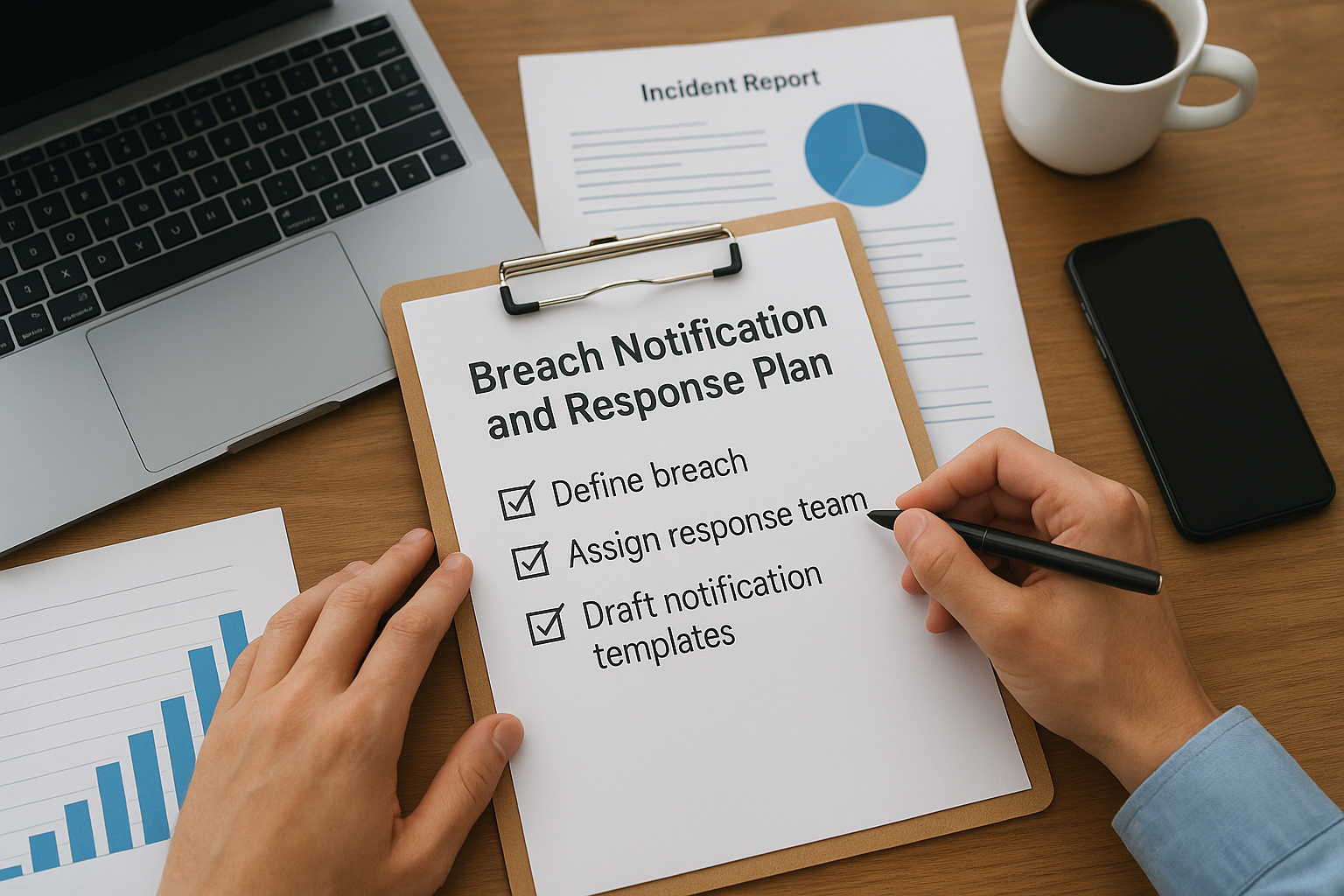
The Breach Notification Rule requires you to notify affected individuals, HHS, and in some cases the media, within specific timeframes after discovering a breach involving unsecured PHI. For most breaches, you have 60 days to notify affected individuals, and breaches affecting 500 or more people require notifying HHS and local media without unreasonable delay. Your plan needs defined steps for detecting an incident, assessing whether it qualifies as a reportable breach, containing the exposure, and documenting every decision along the way. You also need a template for individual notification letters and a clear chain of command for who authorizes each step.
Why it matters for compliance
Missing a notification deadline turns a contained incident into a much larger enforcement problem. HHS treats late or incomplete notification as a separate violation from the breach itself, and organizations without a documented response process consistently take longer to determine whether a breach even occurred. That delay compounds the damage and signals to regulators that your organization wasn't prepared, which affects how penalties get assessed.
The breach itself rarely sinks an organization. The mishandled response almost always does.
For teams integrating with EHR systems, a breach involving OAuth tokens or API credentials can affect data across multiple patient records instantly, so your response plan needs to account for how fast that exposure can scale.
How to implement it
Build your breach response plan around these core components:
- Define what qualifies as a breach versus a low-risk security event, using HHS's risk assessment factors.
- Assign an incident response team with clear roles for detection, investigation, and communication.
- Draft notification templates in advance for individuals, HHS, and media, so you're editing, not writing from scratch.
- Set internal deadlines shorter than the regulatory ones, giving your team buffer time to review before sending.
- Log every incident, even ones that don't meet the reporting threshold, to show a pattern of diligence over time.
Organizations connecting to Epic, Cerner, or Allscripts through SoFaaS benefit from the platform's audit logging and monitoring, which shortens the detection window considerably since you can trace exactly what happened to PHI moving through EHR connections rather than reconstructing it after the fact.
10. Train your team and monitor compliance continuously
A HIPAA program isn't a project you finish, it's a routine you keep running. This last step in the hipaa compliance checklist ties everything else together, because policies, safeguards, and BAAs only work if your team actually understands them and someone keeps checking that they're being followed. Skip this step and even the best-documented program decays within a year.
What this step involves
HIPAA requires workforce training for anyone who touches PHI, delivered at hire and repeated at least annually. Training needs to cover the specific policies you built in earlier steps: patient rights, access controls, breach reporting, and acceptable use of systems that connect to PHI. Beyond training, you need ongoing monitoring, which means periodic internal audits, access log reviews, and a documented schedule for re-testing your safeguards rather than assuming they still work because they worked last year.
Why it matters for compliance
Untrained staff are the most common source of HIPAA violations, not because people act maliciously but because they don't recognize a risky action until after they've taken it. Auditors ask for training records by name and date, and a gap in that log is treated as a gap in your entire program. Continuous monitoring matters just as much, since HHS enforcement actions frequently note that organizations had policies on paper but no evidence anyone checked whether staff followed them.
A policy nobody's trained on isn't protection, it's paperwork.
This combination of training and monitoring is also what separates a compliance program that survives an audit from one that only looks good in a slide deck.
How to implement it
Build a training and monitoring cadence you can actually sustain:
- Deliver onboarding training before new hires get any system access involving PHI.
- Repeat training annually, with updates whenever policies or systems change.
- Track completion records by name and date, stored where auditors can find them fast.
- Run quarterly access reviews to catch permissions that should have been revoked.
- Schedule an annual internal audit that re-tests your safeguards against your original risk assessment.
Teams building on SoFaaS still own staff training and internal audits, but they spend less time monitoring the technical layer, since the platform's built-in audit logging and 99.9% uptime SLA give you a reliable record of EHR connection activity to review rather than one you have to assemble yourself.
Keeping your HIPAA program audit-ready
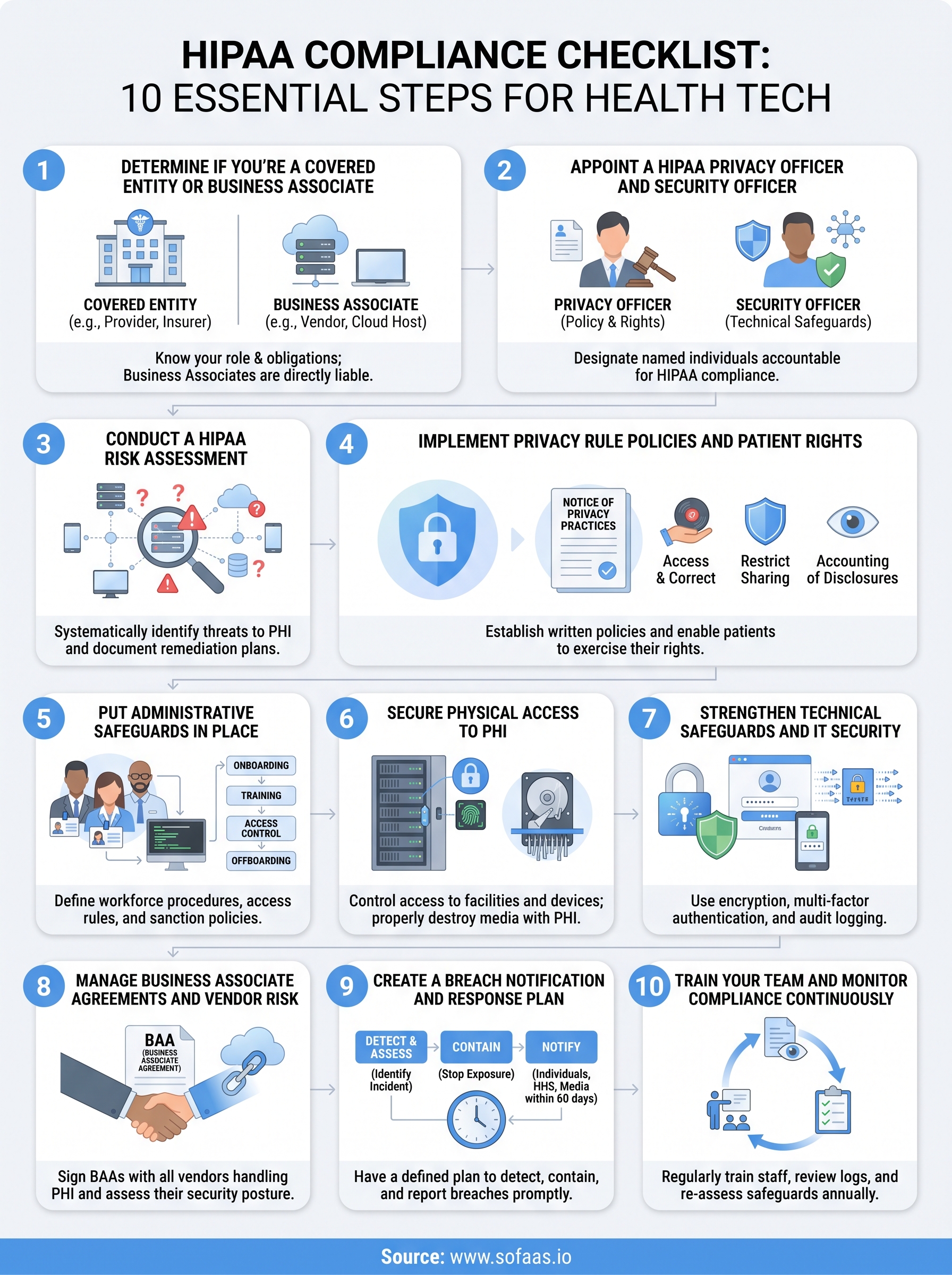
Running through this hipaa compliance checklist once won't keep you compliant forever. HIPAA compliance is a living process, not a certificate you earn and file away. The ten steps here, from classifying your role to training your team, only work as a system when you revisit them regularly and keep documentation current as your organization and integrations grow.
Teams that treat this checklist as a recurring habit, not a one-time project, are the ones that pass audits without scrambling and win trust with EHR partners faster. If you're still building the technical infrastructure behind that trust, especially around Epic, Cerner, or Allscripts connections, you don't need to build it alone. Launch your SMART on FHIR app on infrastructure that's already HIPAA-compliant and SOC 2 Type II certified, so your engineering team can focus on the product instead of reinventing safeguards this checklist already covers.
The Future of Patient Logistics
Exploring the future of all things related to patient logistics, technology and how AI is going to re-shape the way we deliver care.
Thank you! Your submission has been received!
Oops! Something went wrong while submitting the form.