Epic FHIR API: What It Is and How to Get Started

If you're building a healthcare app that needs patient data, you'll eventually hit Epic. It runs the EHR for roughly a third of US hospitals, and integrating with it means working through the Epic FHIR API. That's not a single endpoint you call and forget about. It's a whole ecosystem of app registration, sandbox testing, OAuth flows, and production certification that trips up teams who assume it works like a typical REST API.
This article answers the practical questions developers actually have: what the Epic FHIR API is, how it implements the SMART on FHIR standard, where to find real documentation instead of marketing pages, and how to get a test app running against Epic's sandbox before you touch a live system. You'll see the exact steps from registering on the Epic on FHIR developer portal to requesting the scopes your app needs.
We wrote this from the perspective of teams who've built these integrations before, including the compliance and authorization headaches that don't show up until you're deep into production. If you'd rather skip months of integration work and let a managed platform handle the connector, token management, and HIPAA compliance for you, that path exists too, and we'll point out where it fits.
Why the Epic FHIR API matters for your app
Epic's dominance means you can't route around it
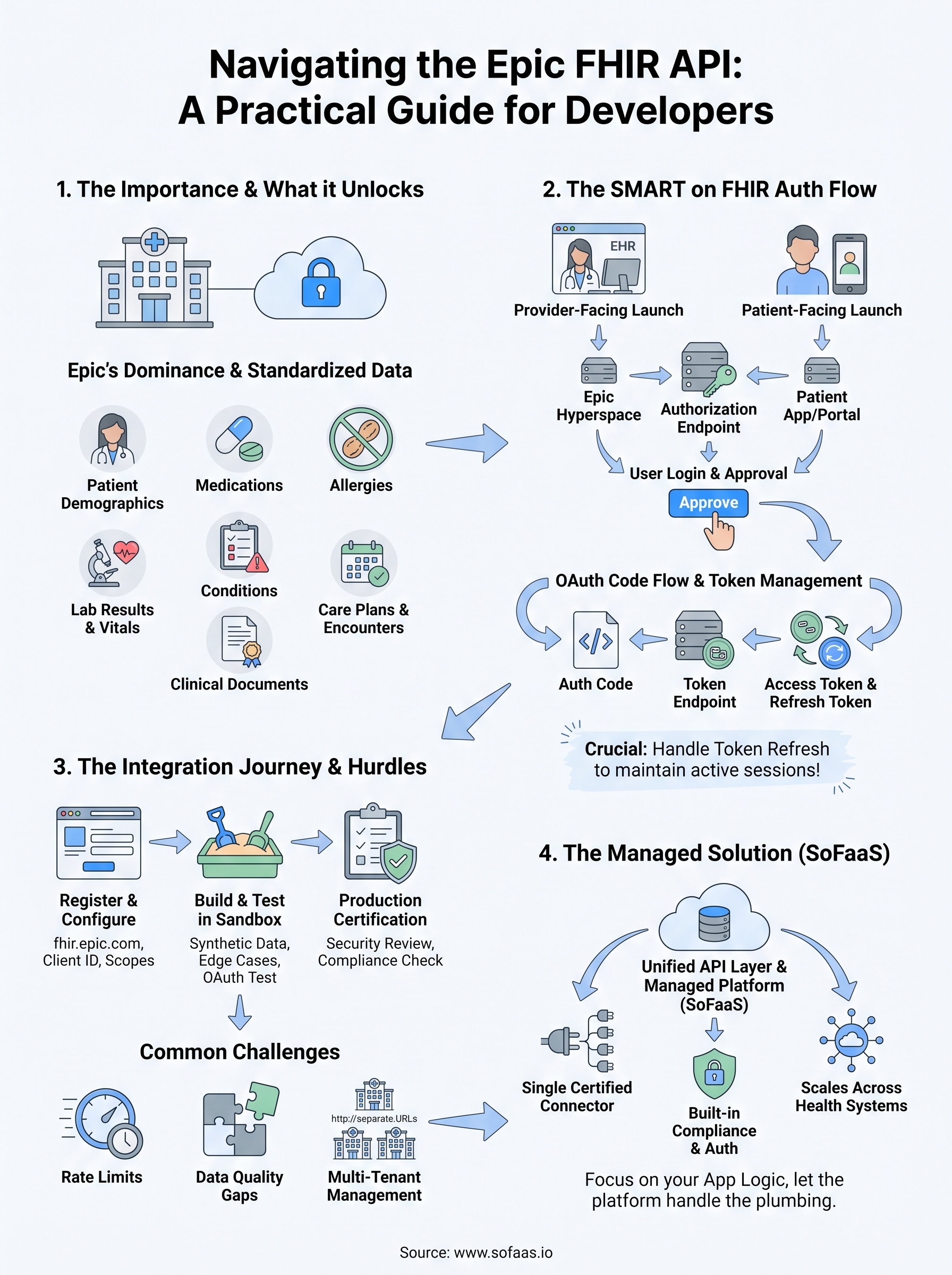
Epic holds close to a third of the acute-care hospital market in the US, and that number understates its real reach. Large academic medical centers, regional health systems, and increasingly ambulatory and specialty clinics all run on Epic, which means the patient data your app needs almost certainly lives inside an Epic instance somewhere. Skip Epic and you're locking your product out of a huge chunk of the potential user base before you've written a line of clinical logic. That's the practical reason the Epic FHIR API matters more than any other single EHR integration: it's rarely optional if you're building anything that touches hospital-based care.
If your app touches patient data in a hospital setting, connecting to Epic isn't a nice-to-have, it's table stakes.
What the API actually unlocks for your app
Once your app authenticates through SMART on FHIR, Epic exposes a standardized set of clinical resources instead of a proprietary data dump you'd have to reverse-engineer. That standardization is the whole point of the FHIR spec, and Epic's implementation follows it closely enough that code you write against Epic's sandbox transfers with modest changes to other FHIR-compliant systems. In practice, that access covers:

- Patient demographics (name, DOB, contact info, coverage)
- Medications (active prescriptions, medication history)
- Allergies and intolerances
- Lab results and vital signs (Observation resources)
- Conditions and problem lists
- Care plans and encounters
- Clinical documents (DocumentReference, notes)
For a care coordination app, a DME ordering platform, or a remote monitoring tool, that's the exact data set you need to function without asking a nurse to manually re-enter it. Read access alone changes what your product can do; write-back access, where Epic allows it, lets your app close the loop by pushing orders, notes, or results directly into the chart.
The real cost of getting it wrong
Missing this layer, or building it poorly, shows up later than you'd expect, usually right when you're trying to close a health system as a customer. Epic requires apps to pass a security review before going live in production, and that review checks things like token handling, encryption, and audit logging, not just whether your calls return the right JSON. Teams that treated Epic FHIR integration as a weekend API project routinely get sent back to rebuild authentication or logging from scratch, burning weeks they didn't budget for. Health system IT departments also do their own vetting on top of Epic's process, and they'll ask pointed questions about your HIPAA compliance posture, your data retention policy, and how you handle patient consent.
Getting the integration right the first time also affects how fast you can add new EHR connections later. An app built cleanly against Epic's FHIR resources, with proper OAuth scoping and consistent data mapping, tends to port to Cerner or Allscripts with far less rework than one built around Epic-specific quirks. That's a real strategic consideration if your roadmap includes selling into health systems that don't all run the same EHR. Underestimating this work is the single most common reason integration timelines slip from a projected six weeks to four or five months, which is exactly the gap a managed platform is designed to close.
How to get started with the Epic FHIR API
Getting your first call working against Epic doesn't take long once you know the sequence. The confusion usually comes from skipping steps or assuming Epic's process mirrors a generic API signup, which it doesn't. Here's the path that actually works.
Register on the Epic on FHIR developer portal
Start at fhir.epic.com, Epic's official developer portal, and create a free account. This is where you register your app, pick the FHIR version you're targeting (Epic supports both DSTU2 and R4, and you should default to R4 unless you have a specific reason not to), and declare the scopes your app needs. Registration also generates the client ID you'll use in every OAuth request later, so treat this step as foundational rather than a formality.
The fastest integrations start with a clean sandbox registration, not a rushed production request.
Build and test against the sandbox
Epic provides a sandbox environment loaded with synthetic patient data, and this is where your real work happens. Use it to:
- Confirm your OAuth 2.0 flow completes and returns a valid access token
- Pull sample resources (Patient, Observation, MedicationRequest) and check the data shapes match what your app expects
- Test error handling for expired tokens, missing scopes, and malformed requests
- Validate that your redirect URIs and launch context work for both provider-facing and patient-facing launch modes
Don't rush this phase. Most of the bugs that surface in production, like mishandled token refreshes or missing consent scopes, get caught here if you actually exercise the edge cases instead of just confirming a happy-path response.
Move toward production certification
Once your sandbox testing is solid, you'll request production access, which triggers Epic's app review. This is where Epic checks your security practices, your handling of PHI, and whether your app behaves the way it declared it would during registration. Expect this review to take real time, often several weeks, and expect it to reject apps that treat security as an afterthought.
If that timeline doesn't fit your launch plans, or you'd rather not build OAuth handling, token refresh logic, and audit logging from scratch, a managed integration platform like SoFaaS handles that layer for you. It connects to Epic through a pre-built, already-certified pathway, so your team focuses on the app logic instead of the plumbing behind app registration and security review.
Key Epic FHIR resources and endpoints to know
Every Epic integration boils down to a handful of resources you'll call constantly, and knowing their exact names and behavior before you start coding saves you from digging through Epic's docs mid-build. The FHIR resource model organizes clinical data into discrete types, and Epic's implementation supports most of the standard set plus some Epic-specific extensions worth knowing upfront.
The resources you'll use most
Most apps only need a small subset of the full FHIR resource catalog. Here's what covers the majority of real-world use cases:
| Resource | What it returns | Common use case |
|---|---|---|
| Patient | Demographics, contact info | Patient matching, registration |
| Observation | Vitals, lab results | Remote monitoring, lab review |
| MedicationRequest | Active and historical prescriptions | Med reconciliation apps |
| Condition | Problem list, diagnoses | Care coordination, risk scoring |
| AllergyIntolerance | Known allergies | Safety checks before ordering |
| Encounter | Visit records | Care episode tracking |
| DocumentReference | Clinical notes, discharge summaries | Chart review tools |
| Coverage | Insurance and plan details | Eligibility and billing workflows |
Master these eight resources and you can build most clinical apps without touching Epic's more obscure endpoints.
How the endpoints are structured
Epic's FHIR endpoints follow a predictable REST pattern once your OAuth token is in hand. A typical read call looks like this:
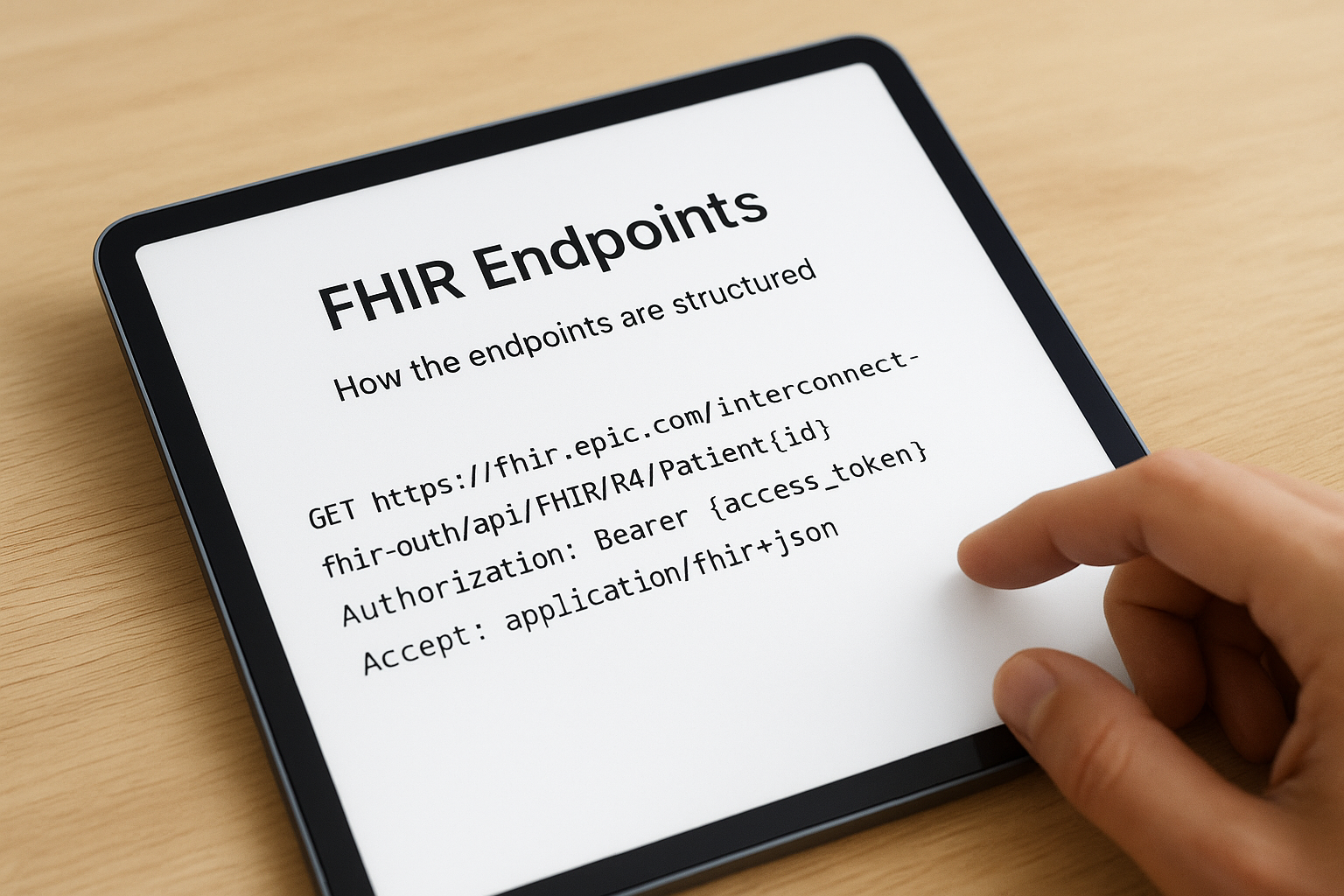
GET https://fhir.epic.com/interconnect-fhir-oauth/api/FHIR/R4/Patient/{id}
Authorization: Bearer {access_token}
Accept: application/fhir+json
Each organization running Epic hosts its own FHIR server, so the base URL changes per health system, even though the resource paths after it stay consistent. Sandbox testing uses Epic's shared test server, but production calls hit the specific hospital's endpoint, which you'll get during app registration or from the health system's IT team directly.
Where teams get tripped up
Search parameters differ subtly between R4 and DSTU2, and Epic doesn't support every optional search parameter the FHIR spec technically allows. Pagination on large result sets, like a patient with years of Observation history, also behaves differently than a typical REST API: you'll need to follow the next link in the response bundle rather than assuming offset-based paging works. These aren't bugs, they're just Epic-specific implementation choices that the official FHIR specification from HL7 leaves open to vendors, and mapping them correctly the first time is exactly the kind of detail a platform like SoFaaS has already solved for you across every EHR it connects to.
Navigating SMART on FHIR authentication in Epic
Authentication is where most Epic integrations either click into place or fall apart. Epic implements the SMART on FHIR authorization framework, which layers OAuth 2.0 with healthcare-specific context like which patient is in view and who's launching the app. Get the flow wrong and you won't just see an error message, you'll see Epic's security review flag your app before it ever reaches production. Understanding the mechanics upfront saves you from rebuilding your auth layer twice.
Provider-facing versus patient-facing launches
Epic supports two distinct launch contexts, and your app needs to declare which one it's built for during registration. A provider-facing launch happens from inside Epic's Hyperspace interface, where a clinician opens your app and Epic passes along the patient and encounter context automatically. A patient-facing launch, by contrast, starts from outside Epic, typically a patient portal or standalone app, and requires your app to handle patient identity and consent independently. Mixing these up during registration is a common early mistake that forces a resubmission.
The authorization code flow, step by step
Most production apps use the standard OAuth 2.0 authorization code flow, which breaks down into a few predictable steps:
- Your app redirects the user to Epic's authorization endpoint with your client ID and requested scopes.
- The user (provider or patient) logs in and approves access.
- Epic redirects back to your app with an authorization code.
- Your app exchanges that code for an access token at Epic's token endpoint.
- You use the access token in the
Authorization: Bearerheader for every subsequent FHIR call.
Skip step five's token refresh logic and your app will silently fail the moment a long session outlives its access token.
Refresh tokens matter here more than teams expect. Sessions in clinical settings can run long, and an access token that expires mid-workflow without a refresh path will break your app in front of a clinician, which is a fast way to lose a health system's trust.
Scopes and consent management
Scopes control exactly what data your app can touch, and Epic enforces them strictly. Requesting broader FHIR scopes than your app actually uses slows down security review and raises questions from health system IT. Patient consent adds another layer on top of scopes, particularly for patient-facing apps, and building that consent flow correctly the first time is one of the areas a managed platform like SoFaaS handles automatically instead of leaving it to your team to reverse-engineer.
Common challenges when building on Epic's FHIR API
Even after registration and sandbox testing go smoothly, real integration work throws up friction that Epic's documentation doesn't fully prepare you for. Most of these problems aren't bugs in your code; they're the natural result of connecting to a system built for clinical workflows first and third-party developers second. Knowing what to expect ahead of time saves you from debugging what looks like a broken API when it's actually expected behavior.
Rate limits and inconsistent performance
Health systems configure their own rate limits on Epic's FHIR endpoints, and those limits vary wildly from one hospital to the next. An app that runs fine against a mid-size regional system can get throttled hard at a large academic medical center handling far more concurrent traffic. Building retry logic with exponential backoff isn't optional here; it's the only way to keep your app functional across a range of Epic instances with different performance ceilings.
The Epic instance that works perfectly in testing might throttle your app the moment a real hospital's traffic hits it.
Data quality and mapping gaps
FHIR standardizes the shape of the data, but it doesn't standardize how consistently a health system fills in every field. You'll routinely hit incomplete records, where an Observation is missing units, or a Condition lacks a coded diagnosis and only has free text. Your app needs defensive parsing logic that handles missing or malformed fields gracefully instead of assuming every response matches the ideal case from Epic's sandbox data.
Managing multiple Epic instances
Here's the part that surprises teams the most: connecting to one Epic-run hospital doesn't mean you're connected to Epic broadly. Each health system runs its own Epic instance with its own base URL, its own configuration choices, and sometimes its own quirks in how it exposes certain resources. Scaling from one pilot customer to ten means repeating parts of the registration and testing process for each new organization, which adds up fast:

- Separate base URLs and client credentials per health system
- Potentially different scopes approved by different IT departments
- Variable data completeness across organizations
- Independent security reviews some hospitals run on top of Epic's own process
This multi-tenant reality is exactly where integration timelines balloon, and it's the specific problem a platform like SoFaaS is built to absorb, since it already maintains the connector logic across many Epic instances instead of making your team rebuild it for every new customer.
Epic FHIR API compared with other EHR integrations
Once you've built one Epic connector, it's tempting to assume the next EHR will work the same way. It won't. Cerner (now Oracle Health) and Allscripts (now Veradigm) both implement the FHIR standard too, but each vendor makes different choices about scopes, endpoint structure, and app review, and those differences show up the moment you try to reuse Epic code against a different system.
Where the standards align and where they diverge
All three major EHR vendors support SMART on FHIR and the core R4 resource set, so the fundamentals transfer: OAuth 2.0 authorization code flow, Bearer tokens, and resources like Patient and Observation look similar on paper across vendors. What doesn't transfer cleanly is the fine print. Scope naming conventions differ, sandbox data varies in completeness, and app review timelines range from a couple weeks to a couple months depending on the vendor. Building against Epic FHIR integration patterns first and expecting Cerner to behave identically is one of the more common planning mistakes teams make.
Standards compliance gets you close, but every EHR vendor still has its own rules for the last mile.
A side-by-side look
| Factor | Epic | Cerner (Oracle Health) | Allscripts (Veradigm) |
|---|---|---|---|
| Market share (US hospitals) | ~34% | ~25% | Smaller, fragmented |
| FHIR version supported | R4, DSTU2 | R4, DSTU2 | R4, DSTU2 (varies by client) |
| App review timeline | Several weeks | Weeks to months | Highly variable |
| Sandbox data quality | Strong, well-documented | Moderate | Inconsistent |
| Multi-tenant complexity | High (per-instance base URLs) | High | Moderate to high |
Why this matters for your roadmap
If your product plan includes selling into health systems beyond Epic's footprint, and most do eventually, you're signing up to repeat this entire registration, sandbox, and review cycle for at least one more vendor, likely more. Each additional EHR adds its own integration timeline and its own set of edge cases your team has to learn from scratch. That's a real cost when you're trying to close deals on a predictable schedule rather than an open-ended one.
This is precisely the argument for a unified API layer instead of vendor-by-vendor engineering. A platform like SoFaaS already maintains certified connectors across Epic, Cerner, and Allscripts, so your app talks to one consistent interface regardless of which EHR sits behind it, and you skip re-learning each vendor's quirks one health system at a time.
Best practices for testing and scaling your integration
Getting a single Epic connection working is one milestone. Keeping it stable across dozens of health systems, each with different traffic patterns and data quirks, is a different problem entirely. The teams that scale smoothly treat testing as an ongoing discipline, not a one-time checkbox before launch.
Build a real test matrix, not just a happy path
Sandbox testing against Epic's synthetic data catches the obvious bugs, but production traffic will surface edge cases your sandbox never modeled. Test against expired tokens, partial patient records, and rate-limited responses deliberately, not just when they happen to occur. A useful testing checklist before you request production access looks like this:
- Confirm token refresh works without dropping an active user session
- Simulate a 429 rate-limit response and verify your retry logic backs off correctly
- Pull a patient record with missing fields and confirm your app doesn't crash
- Test both provider-facing and patient-facing launch contexts if your app supports both
- Verify audit logging captures every PHI access, not just successful ones
An integration that only survives the happy path isn't ready for a real hospital's traffic.
Monitor production, not just pre-launch
Once you're live, monitoring becomes the difference between catching a broken connector in minutes versus finding out from a frustrated health system three days later. Track token expiration failures, response times per Epic instance, and error rates by resource type. Response times in particular vary a lot between a small clinic's Epic instance and a large academic medical center's, so alerting thresholds that work for one will misfire constantly on the other.
Plan your scaling path before you need it
Scaling from one Epic customer to fifteen means repeating registration, credential management, and testing for every new instance, and that work compounds fast if you're doing it manually. Decide early whether your team will own that repeated overhead or whether a managed FHIR platform makes more sense once you pass a handful of customers. SoFaaS was built specifically for this stage: it maintains the certified connector, token management, and compliance layer across every Epic instance you connect to, so scaling to a new health system doesn't mean rebuilding your integration pipeline from scratch. Check the SoFaaS platform overview to see how that scaling path works in practice before you commit engineering time to building it in-house.
Where to go from here
The Epic FHIR API rewards teams who respect its structure: register properly, test every edge case in the sandbox, and treat OAuth and consent as first-class engineering work rather than an afterthought. Do that, and you'll build an app that survives contact with a real hospital's traffic instead of breaking the first time a token expires mid-session.
Skip that groundwork, though, and you'll spend months rebuilding what a managed layer already handles. If your team would rather ship the actual product instead of maintaining OAuth flows, token refresh logic, and per-instance connectors across every health system you sign, that's exactly the gap a platform fills. You get certified connectors, built-in compliance, and one consistent interface across Epic and beyond.
Launch your SMART on FHIR app in a couple of steps and see how much faster production access happens when the plumbing is already solved.
The Future of Patient Logistics
Exploring the future of all things related to patient logistics, technology and how AI is going to re-shape the way we deliver care.
Thank you! Your submission has been received!
Oops! Something went wrong while submitting the form.